Saturday, July 6, 2013

OpenLayers GeoJSON Vector Layer

[caption id="attachment_854" align="alignnone" width="602"]geojson Geojson[/caption]

Let's see how we can add a vector layer to OpenLayers map with the help of  GeoJSON response received from the server. Web Server can produce response in GML, GeoJSON, XML...etc after running a spatial query.
OpenLayers has Format classes for interpreting each kind of response.
This response consists of raw data which should be converted to features and added to a vector layer in order to render with OpenLayers.

[sourcecode language="javascript"]
var newLayer = new OpenLayers.Layer.Vector("Filtered by Zoom Level", {
strategies: [new OpenLayers.Strategy.BBOX(),
],

protocol: new OpenLayers.Protocol.HTTP({
url: "http://localhost/test/a.php?start=79.891119%207.078768&end=81.000609%207.940130&method=SPD",
format: new OpenLayers.Format.GeoJSON({
externalProjection: new OpenLayers.Projection("EPSG:4326"),
internalProject: new OpenLayers.Projection("EPSG:900913")
})
}),

//filter: filter,

// styleMap: styleMap,
format: new OpenLayers.Format.GeoJSON({
externalProjection: new OpenLayers.Projection("EPSG:4326"),
internalProject: new OpenLayers.Projection("EPSG:900913")
})

});
map.addLayers([newLayer]);
[/sourcecode]

Another Way

[sourcecode language="javascript"]
var newLayer = new OpenLayers.Layer.Vector("SPD", {
isBaseLayer: false,

styleMap: new OpenLayers.StyleMap({'default':{
strokeColor: "#F00",
strokeOpacity: 1,
strokeWidth: 2,
fillColor: "#FF5500",
fillOpacity: 0.5,
label : "${ad}",
fontSize: "8px",
fontFamily: "Courier New, monospace",
labelXOffset: "0.5",
labelYOffset: "0.5"
}})
});


OpenLayers.Request.GET({
url: "http://localhost/test/a.php?start=79.891119%207.078768&end=81.000609%207.940130&method=SPD",
headers: {'Accept':'application/json'},
success: function (req)
{
var g = new OpenLayers.Format.GeoJSON();
var feature_collection = g.read(req.responseText);
newLayer.destroyFeatures();
newLayer.addFeatures(feature_collection);
}
});
map.addLayers([newLayer]);
[/sourcecode]

Monday, June 24, 2013

How to split ul into multiple columns

[caption id="attachment_851" align="alignnone" width="308"]ul multi column ul multi column[/caption]

[sourcecode language="css"]
ul{
width: 300px;
overflow: hidden;
}

ul li{
float: left;
width: 75px;
}
[/sourcecode]

Tuesday, June 18, 2013

HTML Email with Codeigniter

[sourcecode language="php"]
$this->email->to( 'abc@gmail.com' );
$this->email->subject( 'Test' );
$this->email->message( $this->load->view( 'email/message', $data, true ) );
$this->email->send();
[/sourcecode]

Monday, May 27, 2013

Codeigniter configuration for PostgreSQL Database

https://www.youtube.com/watch?v=fIu4TGBvZYo


First enable Postgresql extension in php.ini
extension=php_pgsql.dll

You also can enable Postgresql extension for PDO as well.
extension=php_pdo_pgsql.dll

If you forgot to enable this you may come across following error.
A PHP Error was encountered

Severity: Warning

Message: require_once(C:/www/system/database/drivers/postgres/postgres_driver.php) [function.require-once]: failed to open stream: No such file or directory

Filename: database/DB.php

Line Number: 138

Now opendatabase configuration file. You should enter correct settings for connecting with your PostgreSQL database here.
Sample config file.

[sourcecode language="php"]
$db['default']['hostname'] = 'localhost';
$db['default']['username'] = 'postgres';
$db['default']['password'] = 'postgres';
$db['default']['database'] = 'abc_gis';
$db['default']['dbdriver'] = 'postgre';
$db['default']['dbprefix'] = '';
$db['default']['pconnect'] = TRUE;
$db['default']['db_debug'] = TRUE;
$db['default']['cache_on'] = FALSE;
$db['default']['cachedir'] = '';
$db['default']['char_set'] = 'utf8';
$db['default']['dbcollat'] = 'utf8_general_ci';
$db['default']['swap_pre'] = '';
$db['default']['autoinit'] = TRUE;
$db['default']['stricton'] = FALSE;
$db['default']['port'] = 5432;
[/sourcecode]

Sunday, May 19, 2013

Codeigniter Facebook Login Tutorial using Facebook PHP SDK


Demo

Download

Welcome to my new Codeigniter tutorial for Facebook Login. I assume that you are familar with Codeigniter framework before starting the tutorial. However, you can adopt the source code to use in native PHP application if you are not interested in CI. There is another alternative. Previously, I have published two posts related with Facebook Login. You can also refer those tutorials.

Facebook OAUTH dialog with new Graph API
AJAX Facebook Connect Demo

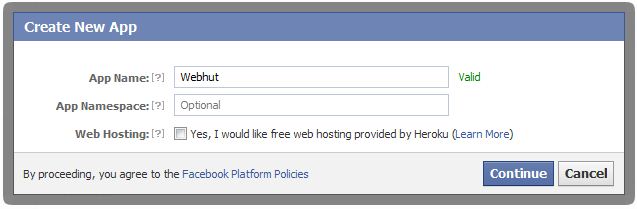
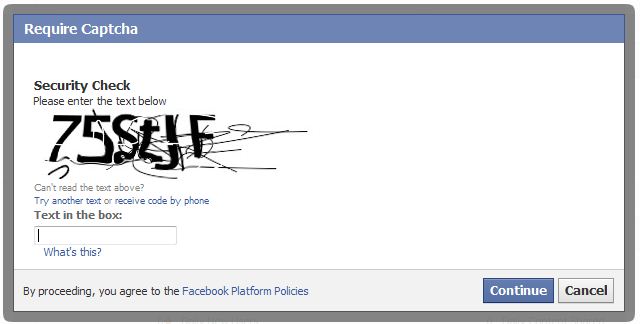
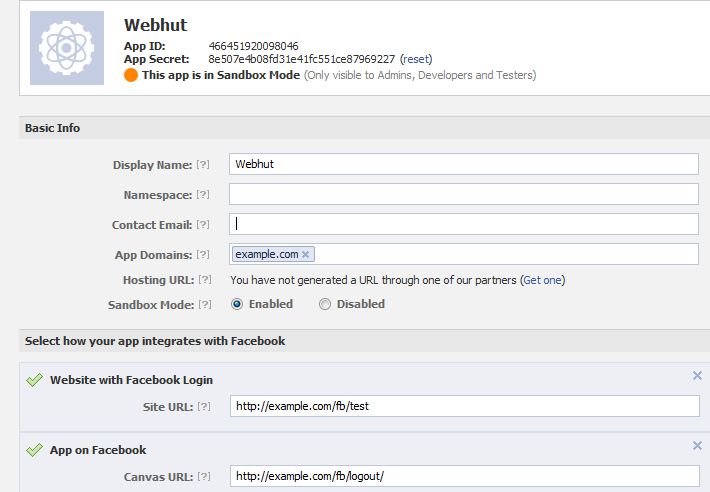
First you need to create a Facebook application.
Visit this link to  create new app.
This is a straight-forward process.

New App


You need to get the App ID and App Secret of your application.

First create a config file to store App ID and App Secret.

config_facebook.php

[sourcecode language="php"]
$config['appID']    = '135042780009818';
$config['appSecret']    = 'c8786043eaf9339d28568520a18b2d2f';
[/sourcecode]

Add a controller that handles Facebook login and logout.
fb.php

[sourcecode language="php"]
<?php
if (!defined('BASEPATH'))
exit('No direct script access allowed');

//include the facebook.php from libraries directory
require_once APPPATH . 'libraries/facebook/facebook.php';

class Fb extends CI_Controller {

public function __construct() {
parent::__construct();
$this->config->load('config_facebook');
}

public function index() {
$this->load->view('head');
$this->load->view('fb');
$this->load->view('footer');
}

public function logout() {
$signed_request_cookie = 'fbsr_' . $this->config->item('appID');
setcookie($signed_request_cookie, '', time() - 3600, "/");
$this->session->sess_destroy();  //session destroy
redirect('/fb/index', 'refresh');  //redirect to the home page
}

public function fblogin() {

$facebook = new Facebook(array(
'appId' => $this->config->item('appID'),
'secret' => $this->config->item('appSecret'),
));
// We may or may not have this data based on whether the user is logged in.
// If we have a $user id here, it means we know the user is logged into
// Facebook, but we don't know if the access token is valid. An access
// token is invalid if the user logged out of Facebook.
$user = $facebook->getUser(); // Get the facebook user id
$profile = NULL;
$logout = NULL;

if ($user) {
try {
$profile = $facebook->api('/me');  //Get the facebook user profile data
$access_token = $facebook->getAccessToken();
$params = array('next' => base_url('fb/logout/'), 'access_token' => $access_token);
$logout = $facebook->getLogoutUrl($params);

} catch (FacebookApiException $e) {
error_log($e);
$user = NULL;
}

$data['user_id'] = $user;
$data['name'] = $profile['name'];
$data['logout'] = $logout;
$this->session->set_userdata($data);
redirect('/fb/test');
}
}

public function test() {
$this->load->view('test');
}

}

/* End of file fb.php */
/* Location: ./application/controllers/fb.php */
[/sourcecode]

In this tutorial, I'm using Facebook JavaScript SDK to load the oauth dialog. You need to add the App ID in following code to initiate the SDK successfully.

[sourcecode language="javascript"]
<img src="<?php echo base_url('assets/images/facebook.png');?>" id="facebook_login">
<script type="text/javascript">
window.fbAsyncInit = function() {
//Initiallize the facebook using the facebook javascript sdk
FB.init({
appId:'<?php $this->config->load('config_facebook'); echo $this->config->item('appID');?>',
cookie:true, // enable cookies to allow the server to access the session
status:true, // check login status
xfbml:true, // parse XFBML
oauth : true //enable Oauth
});
};
//Read the baseurl from the config.php file
(function(d){
var js, id = 'facebook-jssdk', ref = d.getElementsByTagName('script')[0];
if (d.getElementById(id)) {return;}
js = d.createElement('script'); js.id = id; js.async = true;
js.src = "//connect.facebook.net/en_US/all.js";
ref.parentNode.insertBefore(js, ref);
}(document));
//Onclick for fb login
$('#facebook_login').click(function(e) {

FB.login(function(response) {
if(response.authResponse) {
parent.location ='<?php echo base_url('fb/fblogin'); ?>'; //redirect uri after closing the facebook popup
}
},{scope: 'email,read_stream,publish_stream,user_birthday,user_location,user_work_history,user_hometown,user_photos'}); //permissions for facebook
});
</script>
[/sourcecode]

Monday, May 13, 2013

Reverse Geocoding with Google Map API

[caption id="attachment_833" align="alignnone" width="499"]Reverse Geocoding Reverse Geocoding[/caption]

Demo

If you know the latitude and longitude of a particular location, you can get the relevant address details such as city, state, region, country...etc. This process is known as Reverse Geocoding. In this post I 'm gonna show you how this could be achieved with famous Google Map API. This entire post is based on one API request. Look at below code.

[sourcecode language="javascript"]
http://maps.googleapis.com/maps/api/geocode/json?latlng=-37.814251,144.963169&sensor=false
[/sourcecode]

Enter above line in the browser bar to see a whole bunch of location details for the geographical point (-37.814251,144.963169) in lat lng format.
Pretty Simple. Here I'm using Google Map JavaScript API V3. All you need to do is to parse the json response to extract the information whatever you need.

[sourcecode language="javascript"]
jQuery.ajax({
url: 'http://maps.googleapis.com/maps/api/geocode/json?latlng=-37.814251,144.963169&sensor=false',
type: 'POST',
dataType: 'json',
success: function(data) {
if(data.status == 'OK')
{

alert(data.results[1].formatted_address);
alert(data.results[1].address_components[0].long_name);
alert(data.results[1].address_components[1].long_name);

}

},
error: function(xhr, textStatus, errorThrown) {
alert("Unable to resolve your location");

}
});
[/sourcecode]

Wednesday, April 24, 2013

Google Map Street View

[caption id="attachment_826" align="alignnone" width="277"]Google Map Street View Google Map Street View[/caption]

Demo

[sourcecode language="javascript"]
<!DOCTYPE html>
<html>
<head>
<meta charset="<a>utf-8</a>">
<title>Street View service</title>
<link href="<a href="view-source:https://google-developers.appspot.com/maps/documentation/javascript/examples/default.css">/maps/documentation/javascript/examples/default.css</a>" rel="<a>stylesheet</a>">
<script src="<a href="view-source:https://maps.googleapis.com/maps/api/js?v=3.exp&sensor=false">https://maps.googleapis.com/maps/api/js?v=3.exp&sensor=false</a>"></script>
<script>
function initialize() {
var fenway = new google.maps.LatLng(42.345573,-71.098326);
var mapOptions = {
center: fenway,
zoom: 14,
mapTypeId: google.maps.MapTypeId.ROADMAP
};
var map = new google.maps.Map(
document.getElementById('map-canvas'), mapOptions);
var panoramaOptions = {
position: fenway,
pov: {
heading: 34,
pitch: 10
}
};
var panorama = new google.maps.StreetViewPanorama(document.getElementById('pano'),panoramaOptions);
map.setStreetView(panorama);
}

google.maps.event.addDomListener(window, 'load', initialize);

</script>
</head>
<body>
<div id="<a>map-canvas</a>" style="<a>width: 400px; height: 300px</a>"></div>
<div id="<a>pano</a>" style="<a>position:absolute; left:410px; top: 8px; width: 400px; height: 300px;</a>"></div>
</body>
</html>
[/sourcecode]

Saturday, April 20, 2013

Building ASP.NET MVC3 Applications

[caption id="attachment_811" align="aligncenter" width="255"]ASP.NET MVC3 ASP.NET MVC3[/caption]

Welcome Back, today we gonna build a simple MVC application using ASP.net MVC3 template. The tutorial does not intend to teach you ASP.net MVC3 framework. There are so many resources on the internet that might help you getting started with this technology. So we focus on building a simple application using models, views, controllers, filters and other ASP.net specific things. Remember  MVC is a design pattern and it can also be  implemented in other programing languages like PHP.

Final result
Book Mgmt


Download Project

1. Creating New Project

creating-project

creating-project

2. Folder Structure

directory structure

3. Changing the default controller.

You can change the default controller in Global.asax file by specifying the controller name and action method.

Changing the default controller

4. Adding Dojo files

We are using Dojo data grid for displaying data records. Therefore please download Dojo latest version and include them in Scripts folder.

5. Creating Book Modal
Right click on Models -> Add -> Class
Book.cs

[sourcecode language="csharp"]
using System;
using System.Collections.Generic;
using System.Linq;
using System.Web;
using System.ComponentModel.DataAnnotations;

namespace BooksApp.Models
{
public class Book
{
public int Id { get; set; }
[Required]
public string Name { get; set; }
[Required]
public string Author { get; set; }
[Required]
public float Price { get; set; }
}
}
[/sourcecode]

6. Creating BookFacade class
For a  real application database operations can be placed in this class. For the sake of simplicity we omit mapping entity to  database.
Right click on Models -> Add -> Class
BookFacade.cs

[sourcecode language="csharp"]
using System;
using System.Collections.Generic;
using System.Linq;
using System.Web;
using BooksApp.Models;

namespace BooksApp.Facade
{
public class BookFacade
{
public static List<Book> bookList { get; set; }

public static List<Book> GetBookList()
{
if (bookList == null)
{
bookList = new List<Book>();
for (int i = 0; i < 10; i++)
{
bookList.Add(new Book {Id = i, Name = "Book " + i, Author = "Author " + i, Price = i * 20 });
}

}
return bookList;
}

public static Book FindBook(int id)
{
var bookList = GetBookList();
return bookList.Find(x => x.Id == id);
}

public static void Add(Book book)
{
var bookList = GetBookList();
book.Id = bookList.Max(x => x.Id) + 1;
bookList.Add(book);
}

public static void Delete(int id)
{
var bookList = GetBookList();
Book book = bookList.Find(x => x.Id == id);
bookList.Remove(book);
}

}
}
[/sourcecode]

7. Creating BookController
Right click on Controllers-> Add -> Controller
BookController

[sourcecode language="csharp"]
using System;
using System.Collections.Generic;
using System.Linq;
using System.Web;
using System.Web.Mvc;
using BooksApp.Models;
using BooksApp.Facade;
using BooksApp.Filters;

namespace BooksApp.Controllers
{
public class BookController : Controller
{
//
// GET: /Book/

public ActionResult Index()
{
return View();
}

public ActionResult Create()
{
return View();
}

[AcceptVerbs(HttpVerbs.Post)]
public ActionResult Create(Book book)
{
if (book.Name.Length < 5)
{
ModelState.AddModelError("Book name", "Book name should have five or more characters.");
}
if (!ModelState.IsValid)
{
return View("Create",book);
}
BookFacade.Add(book);
return RedirectToAction("Index");
}

public ActionResult GetData(int id)
{
Book book = BookFacade.FindBook(id);
return View(book);
}

[RightChecker(AllowedBookIds = "5,6,7")]
public ActionResult Delete(int id)
{
Book book = BookFacade.FindBook(id);
if (book != null)
{
BookFacade.Delete(id);
}
return RedirectToAction("Index");

}

/////////////////////////AJAX/////////////////////////////

public ActionResult GetJSON()
{
return Json(BookFacade.GetBookList(), JsonRequestBehavior.AllowGet);

}

public ActionResult Ajax()
{
return View();
}

[AcceptVerbs(HttpVerbs.Post)]
public ActionResult Create_AJAX(Book book)
{
BookFacade.Add(book);
return new EmptyResult();
}

}
}

[/sourcecode]

Adding views
8. Adding Create View

 create view

[sourcecode anguage="csharp"]
<%@ Page Language="C#" Inherits="System.Web.Mvc.ViewPage<BooksApp.Models.Book>" %>

<!DOCTYPE html>

<html>
<head runat="server">
<title>Create</title>
</head>
<body>
<script src="<%: Url.Content("~/Scripts/jquery-1.5.1.min.js") %>" type="text/javascript"></script>
<script src="<%: Url.Content("~/Scripts/jquery.validate.min.js") %>" type="text/javascript"></script>
<script src="<%: Url.Content("~/Scripts/jquery.validate.unobtrusive.min.js") %>" type="text/javascript"></script>

<% using (Html.BeginForm("Create","Book")) { %>
<%: Html.ValidationSummary(true) %>
<fieldset>
<legend>Book</legend>

<div>
<%: Html.LabelFor(model => model.Name) %>
</div>
<div>
<%: Html.EditorFor(model => model.Name) %>
<%: Html.ValidationMessageFor(model => model.Name) %>
</div>

<div>
<%: Html.LabelFor(model => model.Author) %>
</div>
<div>
<%: Html.EditorFor(model => model.Author) %>
<%: Html.ValidationMessageFor(model => model.Author) %>
</div>

<div>
<%: Html.LabelFor(model => model.Price) %>
</div>
<div>
<%: Html.EditorFor(model => model.Price)%>
<%: Html.ValidationMessageFor(model => model.Price)%>
</div>

<p>
<input type="submit" value="Create" />
</p>
</fieldset>
<% } %>

<div>
<%: Html.ActionLink("Back to List", "Index") %>
</div>
</body>
</html>

[/sourcecode]

9. Adding GetData View

Get Data View

[sourcecode language="csharp"]
<%@ Page Language="C#" Inherits="System.Web.Mvc.ViewPage<BooksApp.Models.Book>" %>

<!DOCTYPE html>

<html>
<head runat="server">
<title>Book Details</title>
</head>
<body>
<fieldset>
<legend>Book</legend>

<div>Name</div>
<div>
<%: Html.DisplayFor(model => model.Name) %>
</div>

<div>Author</div>
<div>
<%: Html.DisplayFor(model => model.Author) %>
</div>

<div>Price</div>
<div>
<%: Html.DisplayFor(model => model.Price) %>
</div>
</fieldset>
<p>

<%: Html.ActionLink("Edit", "Edit", new { id=Model.Id }) %> |
<%: Html.ActionLink("Back to List", "Index") %>
</p>
</body>
</html>

[/sourcecode]

10. Adding Index View

[sourcecode language="csharp"]
<%@ Page Language="C#" Inherits="System.Web.Mvc.ViewPage<dynamic>" %>

<!DOCTYPE html>

<html>
<head runat="server">
<title>Index</title>
<style type="text/css">
@import "../../Scripts/dojo/dijit/themes/dijit.css";
@import "../../Scripts/dojo/dojox/grid/resources/Grid.css";
@import "../../Scripts/dojo/dojox/grid/resources/tundraGrid.css";
@import "../../Scripts/dojo/dijit/themes/tundra/tundra.css";
</style>

<script type="text/javascript" src="../../Scripts/dojo/dojo/dojo.js"
djconfig="isDebug:false,  debugAtAllCosts:false"></script>
<script src="../../Scripts/dojo/dijit/dijit.js" type="text/javascript"></script>

<script language="javascript" type="text/javascript">
dojo.require("dojox.grid.DataGrid");
dojo.require("dojo.data.ItemFileWriteStore");

dojo.ready(function () {

DisplayAll();
});

function DisplayAll() {

var that = this;

// The parameters to pass to xhrGet, the url, how to handle it, and the callbacks.
var xhrArgs = {
url: "../Book/GetJSON",
handleAs: "json",
preventCache: true,
load: function (data, ioargs) {
that.PopulateGrid(data); //This will populate the grid
},
error: function (error, ioargs) {
alert(ioargs.xhr.status);
}

}

// Call the asynchronous xhrGet

dojo.xhrGet(xhrArgs);
}

function PopulateGrid(store) {

var jsonString = "{identifier: \"Id\", items: " + dojo.toJson(store) + "}";  //Creates the Json data that supports the grid structure. The identifier value should be unique or errors will be thrown

var dataStore = new dojo.data.ItemFileReadStore({ data: dojo.fromJson(jsonString) }); //Converts it back to an object and set it as the store

/*set up layout of the grid that will be columns*/
var gridStructure = [
{ field: 'Id', name: 'Book Id', styles: 'text-align: center;', width: 20 },
{ field: 'Name', name: 'Name', width: 20 },
{ field: 'Author', name: 'Author', width: 20 },
{ field: 'Price', name: 'Price', width: 30} //"field" matches to the JSON objects field
];
/*create a new grid:*/

var bookGrid = dijit.byId('gridS');
if (bookGrid == null) { //Only create a grid if there grid already created
var grid = new dojox.grid.DataGrid({
id: 'gridS',
store: dataStore,
structure: gridStructure,
rowSelector: '30px',
height: '300px'
},
"gridDivTag"); //The div tag that is used to place the grid
/*Call startup() to render the grid*/
grid.startup();
}
else {

bookGrid._refresh();
bookGrid.setStore(dataStore); //Setting the new datastore after entering new data
}

}

</script>
</head>
<body>
<div>
<h1>Welcome to Book Management Section</h1>
<% //HtmlAnchor %>

<div id="gridDivTag"></div>
<br /><br />
<%: Html.ActionLink("Add New", "Create") %>
<%: Html.ActionLink("Ajax Call", "Ajax") %>
</div>
</body>
</html>

[/sourcecode]

11. Adding AJAX View
I wanna create this view just to demonstrate AJAX operations with ASP.NET MVC3

[sourcecode language="csharp"]
<%@ Page Language="C#" Inherits="System.Web.Mvc.ViewPage<dynamic>" %>

<!DOCTYPE html>

<html>
<head id="Head1" runat="server">
<title>Ajax</title>
<style type="text/css">
@import "../../Scripts/dojo/dijit/themes/dijit.css";
@import "../../Scripts/dojo/dojox/grid/resources/Grid.css";
@import "../../Scripts/dojo/dojox/grid/resources/tundraGrid.css";
@import "../../Scripts/dojo/dijit/themes/tundra/tundra.css";
.style1
{
width: 134px;
}
</style>

<script type="text/javascript" src="../../Scripts/dojo/dojo/dojo.js" djconfig="isDebug:false,  debugAtAllCosts:false"></script>
<script src="../../Scripts/dojo/dijit/dijit.js" type="text/javascript"></script>

<script language="javascript" type="text/javascript">
dojo.require("dojox.grid.DataGrid");
dojo.require("dojo.data.ItemFileWriteStore");

dojo.ready(function () {

DisplayAll();
});

function book() {
this.Name = dojo.byId("name").value;
this.Author = dojo.byId("author").value;
this.Price = dojo.byId("price").value;
}
function addBook_post() {
var bookObj = new book();

var xhrArgs = {
url: "../Book/Create_AJAX",
headers: { //Adding the request headers
"Content-Type": "application/json; charset=utf-8" // This is important to model bind to the server
},
postData: dojo.toJson(bookObj, true), //Converting the object in to Json to be sent the action method
handleAs: "json",
load: function (data) {
DisplayAll();

},
error: function (error) {
alert('error');
}
}

dojo.xhrPost(xhrArgs);
}

function DisplayAll() {

var that = this;

// The parameters to pass to xhrGet, the url, how to handle it, and the callbacks.
var xhrArgs = {
url: "../Book/GetJSON",
handleAs: "json",
preventCache: true,
load: function (data, ioargs) {
that.PopulateGrid(data); //This will populate the grid
},
error: function (error, ioargs) {
alert(ioargs.xhr.status);
}

}

// Call the asynchronous xhrGet

dojo.xhrGet(xhrArgs);
}

function PopulateGrid(store) {

var jsonString = "{identifier: \"Id\", items: " + dojo.toJson(store) + "}";  //Creates the Json data that supports the grid structure. The identifier value should be unique or errors will be thrown

var dataStore = new dojo.data.ItemFileReadStore({ data: dojo.fromJson(jsonString) }); //Converts it back to an object and set it as the store

/*set up layout of the grid that will be columns*/
var gridStructure = [
{ field: 'Id', name: 'Book Id', styles: 'text-align: center;', width: 20 },
{ field: 'Name', name: 'Name', width: 20 },
{ field: 'Author', name: 'Author', width: 20 },
{ field: 'Price', name: 'Price', width: 30} //"field" matches to the JSON objects field
];
/*create a new grid:*/

var bookGrid = dijit.byId('gridS');
if (bookGrid == null) { //Only create a grid if there grid already created
var grid = new dojox.grid.DataGrid({
id: 'gridS',
store: dataStore,
structure: gridStructure,
rowSelector: '30px',
height: '300px'
},
"gridDivTag"); //The div tag that is used to place the grid
/*Call startup() to render the grid*/
grid.startup();
}
else {

bookGrid._refresh();
bookGrid.setStore(dataStore); //Setting the new datastore after entering new data
}

}

</script>
</head>
<body >
<form id="form1" runat="server">
<div>
<h1>Welcome to Book Management Section</h1>

<div id="gridDivTag"></div>
<br /><br />

<table style="width: 400px;">
<caption>
Add New Book</caption>
<tr>
<td>
&nbsp;
Name</td>
<td>
&nbsp;
<input id="name" type="text" />
</td>
</tr>
<tr>
<td>
&nbsp;
Author</td>
<td>
&nbsp;
<input id="author" type="text" />
</td>
</tr>
<tr>
<td>
&nbsp; Price</td>
<td>
&nbsp;
<input id="price" type="text" />
</td>
</tr>
<tr>
<td>
&nbsp;</td>
<td>
<input id="add_post" type="submit" value="Add Via Post" onclick="addBook_post()" />

</td>
</tr>
</table>

<br /><br />
<%: Html.ActionLink("Add New", "Create") %>      <%: Html.ActionLink("Ajax Call", "Ajax") %>
</div>
</form>
</body>
</html>

[/sourcecode]

Sample testing links
http://localhost:3616/
http://localhost:3616/Book/Create
http://localhost:3616/Book/Ajax
http://localhost:3616/Book/GetData/1
http://localhost:3616/Book/GetJSON

Obviously port number may change according to your environment.

Monday, April 8, 2013

How to use PHP session upload progress bar

** Credits goes to original author of this code

test.php

[sourcecode language="php"]
<?php
if ($_SERVER["REQUEST_METHOD"] == "POST" && !empty($_FILES["userfile"])) {
move_uploaded_file($_FILES["userfile"]["tmp_name"], "tmp/" . $_FILES["userfile"]["name"]);
}
?>
<html>
<head>
<title>File Upload Progress Bar</title>
<style type="text/css">
#bar_blank {
border: solid 1px #000;
height: 20px;
width: 300px;
}

#bar_color {
background-color: #006666;
height: 20px;
width: 0px;
}

#bar_blank, #hidden_iframe {
display: none;
}
</style>
</head>
<body>
<div id="bar_blank">
<div id="bar_color"></div>
</div>
<div id="status"></div>
<form action="<?php echo $_SERVER["PHP_SELF"]; ?>" method="POST"
id="myForm" enctype="multipart/form-data" target="hidden_iframe">
<input type="hidden" value="myForm"
name="<?php echo ini_get("session.upload_progress.name"); ?>">
<input type="file" name="userfile"><br>
<input type="submit" value="Start Upload">
</form>

<script type="text/javascript">
function toggleBarVisibility() {
var e = document.getElementById("bar_blank");
e.style.display = (e.style.display == "block") ? "none" : "block";
}

function createRequestObject() {
var http;
if (navigator.appName == "Microsoft Internet Explorer") {
http = new ActiveXObject("Microsoft.XMLHTTP");
}
else {
http = new XMLHttpRequest();
}
return http;
}

function sendRequest() {
var http = createRequestObject();
http.open("GET", "progress.php");
http.onreadystatechange = function () { handleResponse(http); };
http.send(null);
}

function handleResponse(http) {
var response;
if (http.readyState == 4) {
response = http.responseText;
document.getElementById("bar_color").style.width = response + "%";
document.getElementById("status").innerHTML = response + "%";

if (response < 100) {
setTimeout("sendRequest()", 1000);
}
else {
toggleBarVisibility();
document.getElementById("status").innerHTML = "Done.";
}
}
}

function startUpload() {
toggleBarVisibility();
setTimeout("sendRequest()", 1000);
}

(function () {
document.getElementById("myForm").onsubmit = startUpload;
})();
</script>
</body>
</html>
[/sourcecode]

progress.php

[sourcecode language="php"]
<?php
session_start();

$key = ini_get("session.upload_progress.prefix") . "myForm";
if (!empty($_SESSION[$key])) {
$current = $_SESSION[$key]["bytes_processed"];
$total = $_SESSION[$key]["content_length"];
echo $current < $total ? ceil($current / $total * 100) : 100;
}
else {
echo 100;
}
[/sourcecode]

Linux Client Server Socket Program

Today let's see how to create an effective socket program with client and server communication capability. This program is based on TCP protocol. First, server program should be launched. You can specify a port in server for listening client requests. When the server get a  client request, server needs to create a separate process for that client. When running client program, client should know IP address and the server port.

Server.c

[sourcecode language="c"]
#include <stdio.h>
#include <sys/types.h>
#include <sys/socket.h>
#include <linux/in.h>
#include <stdlib.h>
#include <unistd.h>
#include <errno.h>
#include <string.h>
#include <stdbool.h>
#include <math.h>

float stof(const char* s);
float calculator(char *calculation);

extern int errno;

int main(int argc,char **argv)
{
int clientaddrlen, listenfd, connectfd, bytes_rcvd, listen_queue_size=1;
short int port_no;
char readBuff[1000];
struct sockaddr_in servaddr, clientaddr;
pid_t  childpid;
int status;
char sendBuff[1025];

if(argc!=3){
printf("Usage Format: ./server -p <PortNumber>\n");
printf("Sample Run: ./server -p 2000\n");
exit(1);
}
port_no = atoi(argv[argc-1]);
printf("Server running at port #%d\n", port_no);

// Create server socket.
if ( (listenfd = socket(AF_INET, SOCK_STREAM, 0)) < 0){
fprintf(stderr, "Cannot create server socket! errno %i: %s\n",errno,strerror(errno));
exit(1);
}
printf("Server socket created\n");
// Bind (attach) this process to the server socket.
servaddr.sin_family = AF_INET;
servaddr.sin_addr.s_addr = htonl(INADDR_ANY);
servaddr.sin_port = htons(port_no);
errno = bind(listenfd, (struct sockaddr *) &servaddr, sizeof(servaddr));
if(errno < 0){
printf("Server bind failure errno %i: %s\n",errno,strerror(errno));
exit(1);
}
printf("Server socket is bound to port #%d\n", port_no);
// Turn 'listenfd' to a listening socket. Listen queue size is 1.
errno=listen(listenfd,listen_queue_size);
if(errno < 0){
printf("Server listen failure errno %i: %s\n",errno,strerror(errno));
exit(1);
}
printf("Server listening with a queue of size %d. \n", listen_queue_size);
// Wait for connection(s) from client(s).
while (1){
clientaddrlen = sizeof(clientaddr);
connectfd = accept(listenfd, (struct sockaddr *) &clientaddr, &clientaddrlen);
if(connectfd<0){
printf("Server accept failure errno %d: %s\n",errno,strerror(errno));
exit(1);
}
printf("A connection received from a client. Creating a child to serve the client.\n");
if((childpid = fork()) == 0) { /* child process */
close(listenfd); /* close listening socket */
printf("Child process serving the client.\n");
if (recv(connectfd, readBuff, sizeof(readBuff), 0 ) > 0){
printf("Received message: %s\n", readBuff);
float answer = calculator(readBuff);
char msg[60];
char chAns[30]="";
sprintf(chAns,"%f",answer);
strcat(msg,chAns);
write(connectfd,msg, strlen(readBuff));
}
//close(connectfd);   /* parent closes connected socket */
exit(1);
}
else if (childpid <0){ /* failed to fork */
printf("Failed to fork\n");
printf("Fork error errno %d: %s\n",errno,strerror(errno));
}
else if(childpid != 0){  /* parent process */
close(connectfd);   /* parent closes connected socket */
childpid = wait(&status);
}
}
return 0;
}

float calculator(char calculation[256])
{

char *token;

char *val1;
char *val2;

float  v1;
float  v2;
float  ans=-9999.0f;

bool validCal = true;

printf("****\n");

char tempCalculation[256];

strcpy(tempCalculation,calculation);

printf("****\n");

token = strtok(tempCalculation,"+-*//^");

int c = 0;
while(token != NULL)
{
c++;
printf("%d\n",c);

if(c == 1)
val1 = token;

if(c == 2)
val2 = token;

printf("%s\n",token);
token = strtok(NULL,"+-*//^");

}

if(c == 2)
{

int i1;
const int lenVal1 = strlen(val1);
for(i1=0; i1<lenVal1 ; i1++)
{
if(!isdigit(val1[i1]))
break;
}
if(i1 != lenVal1)
validCal = false;

int i2;
const int lenVal2 = strlen(val2)-1;
for(i2=0; i2<lenVal2 ; i2++)
{
if(!isdigit(val2[i2]))
break;
}
if(i2 != lenVal2)
validCal = false;

printf("operand1:%soperand2:%s\nlen1:%dlen2%d\n",val1,val2,lenVal1,lenVal2);

if(validCal)
{
char operator = calculation[lenVal1];

printf("Operator%c\n",operator);
printf("Calculation:%s\n",calculation);

v1 = stof(val1);
v2 = stof(val2);

printf("v1=%f\n",v1);
printf("v2=%f\n",v2);

float fv1 = stof(val1);
printf("fv1=%f\n",fv1);

//float f1 = 56.4f;
//float f2 = 2.4f;

if(operator == '+')
{
printf("Addition\n");
ans = v1 + v2;
}
else if(operator == '-')
{
printf("Substraction\n");
ans = v1 - v2;
}
else if(operator == '*')
{
printf("Multiplication\n");
ans = v1 * v2;
}
else if(operator == '/')
{
printf("Devision\n");
ans = v1 / v2;
}
else if(operator == '^')
{
printf("Power\n");

}

else
{

}

printf("Answer:%f\n",ans);

}
else
{
printf("The values are not numeric!\n");

}

return ans;

}
else
{
printf("Two operands are required for calculation\n");
validCal = false;

return ans;

}

};

float stof(const char* s){
float rez = 0, fact = 1;
if (*s == '-'){
s++;
fact = -1;
};

int point_seen;
for (point_seen = 0; *s; s++){
if (*s == '.'){
point_seen = 1;
continue;
};
int d = *s - '0';
if (d >= 0 && d <= 9){
if (point_seen) fact /= 10.0f;
rez = rez * 10.0f + (float)d;
};
};
return rez * fact;
};

[/sourcecode]

Client.c

[sourcecode language="c"]
#include <stdio.h>
#include <sys/types.h>
#include <sys/socket.h>
#include <linux/in.h>
#include <stdlib.h>
#include <unistd.h>
#include <errno.h>
#include <string.h>
int main(int argc,char **argv)
{
int clientfd;
short int port_no;
char msg[1000];
char buff[1000];

struct sockaddr_in servaddr;
char *server_ip_address;
if(argc!=5){
printf("Usage Format: ./client -a <IPAddress> -p <PortNumber>\n");
printf("Sample Run: ./client -a 127.0.0.1 -p 2000\n");
exit(1);
}
server_ip_address=(char *)argv[2];
port_no = atoi(argv[4]);
printf("Client will connect to the server at IP %s, port #%d\n", server_ip_address, port_no);

// Create client socket.
if((clientfd = socket(AF_INET, SOCK_STREAM, 0))<0){
printf("Socket could not be created\n");
printf("errno %i: %s\n",errno,strerror(errno));
exit(1);
}
printf("Client socket created\n");
errno=0;
// Connect to the server client
servaddr.sin_family = AF_INET;
servaddr.sin_port = htons(port_no);
if((inet_pton(AF_INET, server_ip_address, &servaddr.sin_addr))<=0){
printf("inet_pton error for %s\n",server_ip_address);
printf("errno %d: %s\n",errno,strerror(errno));
exit(1);
}
errno=0;
if((connect(clientfd, (struct sockaddr *) &servaddr, sizeof(servaddr)))<0){
printf("Connect error\n");
printf("errno %d: %s\n",errno,strerror(errno));
exit(1);
}
printf("Client socket connected\n");
// Read one line of message from the input and send it to the server.
while(1)
{
printf("\nEnter the message to be sent to the server: ");
scanf("%s", msg);
send(clientfd, msg, strlen(msg)+1, 0);
//close(clientfd);

if (recv(clientfd, buff, sizeof(buff), 0 ) > 0){
printf("Server Response: %s\n", buff);

}
}
return 0;
}

[/sourcecode]

Run server :

gcc -oa server.c

./a -p 2000

Run client:

gcc  -ob client.c

./b  -a 127.0.0.1  -p 2000

Saturday, April 6, 2013

OpenLayers - How to add markers and popups

Demo

[sourcecode language="javascript"]

<script src="http://openlayers.org/api/OpenLayers.js"></script>

<script type="text/javascript">
function init(){
map = new OpenLayers.Map('map');
base_layer = new OpenLayers.Layer.WMS( "OpenLayers WMS",
"http://labs.metacarta.com/wms/vmap0", {layers: 'basic'} );
map.addLayer(base_layer);
map.setCenter(new OpenLayers.LonLat(79.8333,6.9167),7);

var markers = new OpenLayers.Layer.Markers( "Markers" );
map.addLayer(markers);

var size = new OpenLayers.Size(21,25);
var offset = new OpenLayers.Pixel(-(size.w/2), -size.h);
var icon = new OpenLayers.Icon('http://www.openlayers.org/dev/img/marker.png', size, offset);
markers.addMarker(new OpenLayers.Marker(new OpenLayers.LonLat(79.8333,6.9167),icon));
markers.addMarker(new OpenLayers.Marker(new OpenLayers.LonLat(79.8333,6.9167),icon.clone()));
marker = new OpenLayers.Marker(new OpenLayers.LonLat(79.8333,6.9167));
markers.addMarker(marker);

marker.events.register("click", marker, function(e){
popup = new OpenLayers.Popup.FramedCloud("chicken",
new OpenLayers.LonLat(79.8333,6.9167),
new OpenLayers.Size(200, 200),
"I was here <br><img src='uploads/me.png' width='90' height='90'>",
null, true);
map.addPopup(popup);
});
}


</script>

</head>

<body onLoad="init()">

<div id="map" style="width:500px;height:300px;margin-left: auto;margin-right:auto;"></div>

[/sourcecode]

How to enable CORS in Laravel 5

https://www.youtube.com/watch?v=PozYTvmgcVE 1. Add middleware php artisan make:middleware Cors return $next($request) ->header('Acces...