Showing posts with label PHP. Show all posts

Monday, September 12, 2016

Laravel 5.1 Useful Resources


Hosting


  • Host in a shared server - http://laraveldaily.com/laravel-and-shared-hosting-working-with-ftp-and-phpmyadmin/


Lumen


https://github.com/lucadegasperi/oauth2-server-laravel

http://esbenp.github.io/2015/05/26/lumen-web-api-oauth-2-authentication/

http://mrgott.com/joomla/24-integrate-oauth2-server-into-lumen-to-secure-your-restful-api-with-access-tokens

http://loige.co/developing-a-web-application-with-lumen-and-mysql/


Friday, October 2, 2015

Change Database Collation with PHP

This little sql statement can change the collation in your database including tables, columns and everywhere. This is something phpMyAdmin can not handle completely.

Credits goes to original poster.

[sourcecode language="php"]

$conn1=new MySQLi("localhost","root","","exam_db");
if($conn1->connect_errno){
    echo mysqli_connect_error();
    exit;
}
$res=$conn1->query("show tables") or die($conn1->error);
while($tables=$res->fetch_array()){
    $conn1->query("ALTER TABLE $tables[0] CONVERT TO CHARACTER SET utf8 COLLATE utf8_unicode_ci") or die($conn1->error);
}
echo "The collation of your database has been successfully changed!";

$res->free();
$conn1->close();


[/sourcecode]

Wednesday, May 20, 2015

DataTables Server Side Processing with CodeIgniter

[caption id="attachment_1101" align="aligncenter" width="273"]DataTables DataTables[/caption]

In this tutorial, we will see how to use popular dataTables with CodeIgniter framework. Note that, pagination is done in client side for this tutorial. Hence this example is not ideal for a big data set. Handling pagination in server side will be discussed in  a future tutorial.

Table format

[sourcecode language="html"]
                             <th>Need identified thru</th>
                                        <th>Total Estimate</th>
                                        <th class="no-sort"></th>
                                        <th class="no-sort"></th>

                                    </tr>
                                </thead>

                            </table>

[/sourcecode]

Initializing and fetching data with ajax

[sourcecode language="javascript"]

<script>
    $(document).ready(function() {
        $('#dataTables').dataTable({
            "ajax": "<?php echo base_url('test/get_json'); ?>",
            "pageLength": <?php echo $this->config->item('results_per_page'); ?>,
            "order": [[ 0, "desc" ]],
            "aoColumnDefs": [
                { "bVisible": false, "aTargets": [0] },
                {
                    "bSortable": false,
                    "aTargets": ["no-sort"]  
                }],
            "dom": 'T<"clear">lfrtip',
            tableTools: {
                "sSwfPath": "<?php echo base_url("plugins/data_tables/extensions/TableTools/swf/copy_csv_xls_pdf.swf"); ?>"
            }
        });
});
</script>
[/sourcecode]

Test Controller

[sourcecode language="php"]
class Test extends CI_Controller {
public function get_json() {
        $this->load->model('test_model');
        $results = $this->test_model->load_grid();
        $data = array();
        foreach ($results  as $r) {
            array_push($data, array(
                $r['rname'],
                $r['year'],
                $r['mname'],
                $r['need'],
                $r['total_cost'],
                anchor('test/view/' . $r['id'], 'View'),
                anchor('test/edit/' . $r['id'], 'Edit')
            ));
        }

        echo json_encode(array('data' => $data));
    }
}
[/sourcecode]

Model

[sourcecode language="php"]
class Test_model extends CI_Model {
public function load_grid() {
        $this->db->select("$this->tbl_urgent_needs.unid,$this->tbl_urgent_needs.year,$this->tbl_urgent_needs.needi,$this->tbl_urgent_needs.total_cost,$this->tbl_maintenance_type.name AS mname,$this->tbl_roads.name AS rname");
        $this->db->from("$this->tbl_urgent_needs");
        $this->db->join("$this->tbl_roads", "$this->tbl_roads.rid = $this->tbl_urgent_needs.rd_id");
        $this->db->join("$this->tbl_maintenance_type", "$this->tbl_maintenance_type.id = $this->tbl_urgent_needs.maint_type_id", "left");
        $this->db->order_by("$this->tbl_urgent_needs.unid", 'ASC');

        $query = $this->db->get();
        return $query->result_array();
    }
}

[/sourcecode]

Friday, July 25, 2014

iPhone Push Notifications PHP Server

iPhone Push Notifications PHP Server

[sourcecode language="php"]
<?php
$ctx = stream_context_create();
stream_context_set_option($ctx, 'ssl', 'local_cert', YOUR_.PEM_FILE);
stream_context_set_option($ctx, 'ssl', 'passphrase', YOUR_PASSPHRASE);

$fp = stream_socket_client(
        'ssl://gateway.sandbox.push.apple.com:2195', $err, $errstr, 60, STREAM_CLIENT_CONNECT | STREAM_CLIENT_PERSISTENT, $ctx);

if (!$fp) {
    exit("Failed to connect: $err $errstr<BR><BR>");
}

echo 'Connected to APN<BR>';


// Create the payload body
$body['aps'] = array(
    'badge' => +1,
    'alert' => 'Testing push notifications',
    'sound' => 'new_wall_paper.wav',
    'action-loc-key' => 'OK'
);

$payload = json_encode($body);

for ($i = 0; $i < count($tokens); $i++) {
    $msg = chr(0) . pack('n', 32) . pack('H*', $tokens [$i]) . pack('n', strlen($payload)) . $payload;
    fwrite($fp, $msg, strlen($msg));
}

echo "Completed sending messages";
fclose($fp);

[/sourcecode]

Wednesday, February 19, 2014

Import Excel Data into MySQL with PHP

phpexcel


To import Excel data, first you need to have a Excel reader. It should be accurate enough to interpret Excel data as expected. There 's a good old Excel reader.


Download PHPExcelReader.

In the downloaded archive, you only need Excel directory with files including oleread.inc and reader.php.

Just extract it where your web server can access.

Next place your excel file or just create one with some dummy data. Make sure this file is readble by the web server.

Finally create your php script to connect with database, read Excel file and insert data into db.

[sourcecode language="php"]
<?php require_once 'Excel/reader.php'; $data = new Spreadsheet_Excel_Reader(); $data->setOutputEncoding('CP1251');
$data->read('a.xls');

$conn = mysql_connect("localhost","root","");
mysql_select_db("test",$conn);

for ($x = 2; $x <= count($data->sheets[0]["cells"]); $x++) {
$first = $data->sheets[0]["cells"][$x][1];
$middle = $data->sheets[0]["cells"][$x][2];
$last = $data->sheets[0]["cells"][$x][3];
$sql = "INSERT INTO mytable (First,Middle,Last)
VALUES ('$first','$middle','$last')";
echo $sql."\n";
mysql_query($sql);
}

?>
[/sourcecode]

Even your 1cent donation is appreciated.
Donate Button with Credit Cards

Saturday, January 18, 2014

Create PDF with fpdf

[caption id="attachment_957" align="aligncenter" width="315"]FPDF FPDF[/caption]

There are various PHP libraries to create PDF documents. FPDF, MPDF, DomPDF, HTML2PDF are among those popular ones. Each of them has some sort of uniqueness in terms of functionality. This tutorial is just a demo of FPDF using official distribution.

Demo


Saturday, December 21, 2013

Generate Excel Data in PHP

[caption id="attachment_952" align="aligncenter" width="598"]Create Excel Create Excel[/caption]

[sourcecode language="php"]
<?php
header("Content-Type: application/xls");
header("Content-disposition: attachment; filename=data.xls");
echo 'Id' . "\t" . 'Item' . "\t" . 'Qty' . "\n";
echo '001' . "\t" . 'Compaq 610 laptop' . "\t" . '02' . "\n";
?>
[/sourcecode]

Monday, October 7, 2013

OpenSource Directions API Demo - YOURS Navigation API

[caption id="attachment_935" align="aligncenter" width="621"]YOURS API Demo YOURS API Demo[/caption]

In this tutorial, I 'll introduce you to YOURS, an OpenSource directions API. There are few OpenSource directions APIs available such as MapQuest, GeoSmart, Nominatim in addition to YOURS. However in my opinion, YOURS is the best and a good alternative to Google Directions which is the most popular Directions provider obviously.

The flexibility of usage has given more power in YOURS over other APIs in the same family. MapQuest is nice but it is not working for many geographical locations of the world other than North America and Europe. Nominatim is poor in its functional level and has less support for geographical diversity.

According to YOURS doucmentation, the API provide following features.

  • Generate fastest or shortest routes in different modes:

    • using all available roads for Car, Bicycle and Pedestrians .

    • using only national, regional or local cycle routes/networks for Bicycle.


  • Unlimited via points (waypoints) to make complex routes.

  • Drag and drop waypoints moving.

  • Drag and drop waypoint ordering.

  • Geolocation: Lookup street- and placenames to determine their coordinates.

  • Reverse geolocation: Lookup coordinates to determing their street- and placenames.You can read other features in doucmentation.


Example URL


http://www.yournavigation.org/api/1.0/gosmore.php?format=kml&flat=52.215676&flon=5.963946&tlat=52.2573&tlon=6.1799&v=motorcar&fast=1&layer=mapnik

This tutorial provides sample code for accessing the API in JavaScript. As JavaScript does not allow  cross domain requests we 're using a proxy which accepts requests from client, forward it to the API and send back server response. The proxy is written in PHP using CURL which is more safe than file_get_contents() and similar content loading functions.

We are using OpenLayers map with a vector layer which is going get features from server response. The route is drawn on map using vector data.

The API also provides travelling time, distance and turn by turn directions.

Demo

client.html

[sourcecode language="html"]
<html>
<head>
<meta http-equiv="Content-Type" content="text/html; charset=utf-8">
<meta name="description" content="OpenSource Directions API Demo - YOURS Navigation API">
<title>OpenSource Directions API Demo</title>
<link rel="stylesheet" href="http://demos.site11.com/assets/css/style.css">
<script src="http://code.jquery.com/jquery-1.9.1.min.js"></script>
<script src="http://openlayers.org/api/OpenLayers.js"></script>

<script type="text/javascript">
var lon = 0;
var lat = 0;
var zoom = 0;

var wgs84 = new OpenLayers.Projection("EPSG:4326");
var mercator = new OpenLayers.Projection("EPSG:900913");

$(document).ready(function(){
layer = new OpenLayers.Layer.OSM("OSM");
geojson_layer = new OpenLayers.Layer.Vector("GeoJSON", {
styleMap: new OpenLayers.StyleMap({
strokeColor: "#F00",
projection: mercator
}),
strategies: [new OpenLayers.Strategy.Fixed()],
protocol: new OpenLayers.Protocol.HTTP({
url: 'proxy.php?flat=6.9344&flon=79.8428&tlat=7.2844590&tlon=80.637459&v=motorcar&fast=1&layer=mapnik',
format: new OpenLayers.Format.GeoJSON()

})
});

var options = {
div : "map",
projection : wgs84,
units: "dd",
numZoomLevels : 7
};
var map = new OpenLayers.Map(options);

map.addLayers([layer,geojson_layer]);
map.setCenter(new OpenLayers.LonLat(79.8428, 6.9344).transform(wgs84,mercator), 12);

//Get Directions
$.ajax({
type: 'GET',

dataType: 'json',
url: 'proxy.php?flat=6.9344&flon=79.8428&tlat=7.2844590&tlon=80.637459&v=motorcar&fast=1&layer=mapnik',
cache: false,
success: function(response){
$("#travel_time").html(response.properties.traveltime);
$("#distance").html(response.properties.distance + ' miles');
$("#directions").html(response.properties.description);
},error: function(){

}
});

});

</script>

<style type="text/css">
#map{
width: 800px;
height: 400px;
border: 2px solid black;
padding:0;
margin:0;
}
</style>

</head>
<body>

<div id="map" style="width: 700px; height: 300px;margin-bottom : 50px;" align="center"></div>


<b>Travel Time</b>
<div id="travel_time"></div>


<b>Distance</b>
<div id="distance"></div>


<b>Directions</b>
<div id="directions"></div>

</body>
</html>

[/sourcecode]

Proxy.php

[sourcecode language="php"]
<?php $flat = $_GET['flat']; $flon = $_GET['flon']; $tlat = $_GET['tlat']; $tlon = $_GET['tlon']; $v = $_GET['v']; $fast = $_GET['fast']; $layer = $_GET['layer']; $myURL = "http://www.yournavigation.org/api/1.0/gosmore.php?format=geojson&instructions=1&flat=".$flat."&flon=".$flon."&tlat=".$tlat."&tlon=".$tlon."&v=".$v."&fast=".$fast."&layer=".$layer; $curl = curl_init(); curl_setopt_array($curl, array( CURLOPT_RETURNTRANSFER => 1,
CURLOPT_URL => $myURL

));

$resp = curl_exec($curl);
curl_close($curl);
echo $resp;
?>

[/sourcecode]

Tuesday, October 1, 2013

OpenSource PHP Graph libraries

[caption id="attachment_930" align="alignnone" width="645"]PHP Graphs PHP Graphs[/caption]

There are so many PHP graph projects which you can find on internet. At the time of writing this post, JpGraph, phpgraphlib and pChart should appear in top Google search results. In my experience, phpgraphlib is developer-friendly and easy to use whereas JpGraph is more robust than others. pChart seems to be little bit outdated though they have updated their project.

JpGraph

phpgraphlib


Wednesday, September 4, 2013

Find Visitor's IP address in PHP

Relying on $_SERVER['REMOTE_ADDR'] to find your client's ip address is not always good. Looking for a wide solution?

Then use this function.

[sourcecode language="php"]
function get_ip() {
$ip = '';
if ($_SERVER['HTTP_CLIENT_IP'])
$ip = $_SERVER['HTTP_CLIENT_IP'];
else if($_SERVER['HTTP_X_FORWARDED_FOR'])
$ip = $_SERVER['HTTP_X_FORWARDED_FOR'];
else if($_SERVER['HTTP_X_FORWARDED'])
$ip = $_SERVER['HTTP_X_FORWARDED'];
else if($_SERVER['HTTP_FORWARDED_FOR'])
$ip = $_SERVER['HTTP_FORWARDED_FOR'];
else if($_SERVER['HTTP_FORWARDED'])
$ip = $_SERVER['HTTP_FORWARDED'];
else if($_SERVER['REMOTE_ADDR'])
$ip = $_SERVER['REMOTE_ADDR'];
else
$ip = '';

return $ip;
}
[/sourcecode]

Saturday, August 31, 2013

Sending Emails with Swift Mailer

"Swift Mailer integrates into any web app written in PHP 5, offering a flexible and elegant object-oriented approach to sending emails with a multitude of features."

Download Documentation

[sourcecode language="php"]
<!--?php require_once 'swiftmailer/lib/swift_required.php'; // Create the Transport //SMTP /*$transport = Swift_SmtpTransport::newInstance('smtp.example.org', 25) --->setUsername('your username')
->setPassword('your password')
;

*/

// Sendmail
//$transport = Swift_SendmailTransport::newInstance('/usr/sbin/sendmail -bs');

// Mail
$transport = Swift_MailTransport::newInstance();

// Create the Mailer using your created Transport
$mailer = Swift_Mailer::newInstance($transport);

// Create a message
$message = Swift_Message::newInstance('Wonderful Subject')
->setFrom(array('john@doe.com' => 'John Doe'))
->setTo(array('receiver@domain.org', 'other@domain.org' => 'A name'))
->setBody('Here is the message itself')
;

// Send the message
$result = $mailer->send($message);
?>

[/sourcecode]

Tuesday, June 18, 2013

HTML Email with Codeigniter

[sourcecode language="php"]
$this->email->to( 'abc@gmail.com' );
$this->email->subject( 'Test' );
$this->email->message( $this->load->view( 'email/message', $data, true ) );
$this->email->send();
[/sourcecode]

Sunday, May 19, 2013

Codeigniter Facebook Login Tutorial using Facebook PHP SDK


Demo

Download

Welcome to my new Codeigniter tutorial for Facebook Login. I assume that you are familar with Codeigniter framework before starting the tutorial. However, you can adopt the source code to use in native PHP application if you are not interested in CI. There is another alternative. Previously, I have published two posts related with Facebook Login. You can also refer those tutorials.

Facebook OAUTH dialog with new Graph API
AJAX Facebook Connect Demo

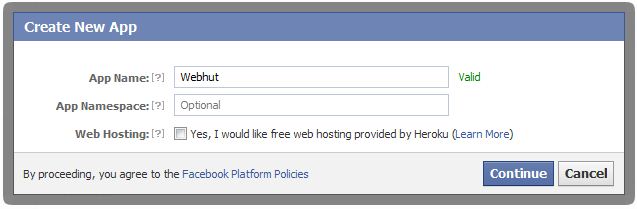
First you need to create a Facebook application.
Visit this link to  create new app.
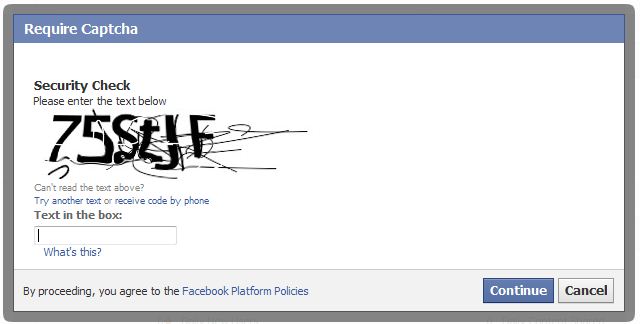
This is a straight-forward process.

New App


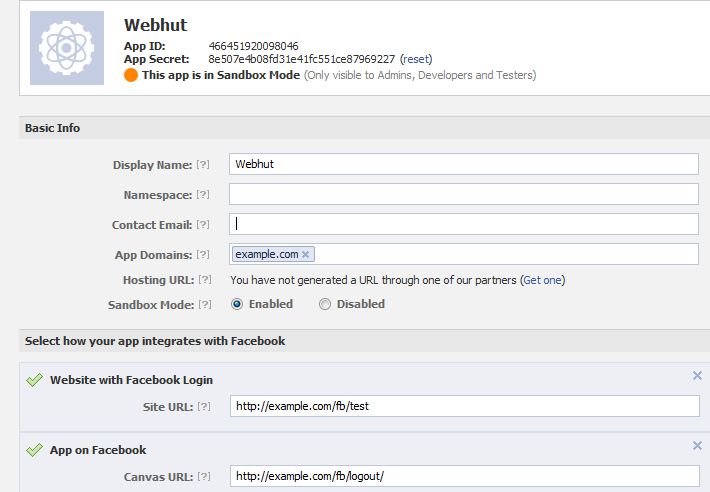
You need to get the App ID and App Secret of your application.

First create a config file to store App ID and App Secret.

config_facebook.php

[sourcecode language="php"]
$config['appID']    = '135042780009818';
$config['appSecret']    = 'c8786043eaf9339d28568520a18b2d2f';
[/sourcecode]

Add a controller that handles Facebook login and logout.
fb.php

[sourcecode language="php"]
<?php
if (!defined('BASEPATH'))
exit('No direct script access allowed');

//include the facebook.php from libraries directory
require_once APPPATH . 'libraries/facebook/facebook.php';

class Fb extends CI_Controller {

public function __construct() {
parent::__construct();
$this->config->load('config_facebook');
}

public function index() {
$this->load->view('head');
$this->load->view('fb');
$this->load->view('footer');
}

public function logout() {
$signed_request_cookie = 'fbsr_' . $this->config->item('appID');
setcookie($signed_request_cookie, '', time() - 3600, "/");
$this->session->sess_destroy();  //session destroy
redirect('/fb/index', 'refresh');  //redirect to the home page
}

public function fblogin() {

$facebook = new Facebook(array(
'appId' => $this->config->item('appID'),
'secret' => $this->config->item('appSecret'),
));
// We may or may not have this data based on whether the user is logged in.
// If we have a $user id here, it means we know the user is logged into
// Facebook, but we don't know if the access token is valid. An access
// token is invalid if the user logged out of Facebook.
$user = $facebook->getUser(); // Get the facebook user id
$profile = NULL;
$logout = NULL;

if ($user) {
try {
$profile = $facebook->api('/me');  //Get the facebook user profile data
$access_token = $facebook->getAccessToken();
$params = array('next' => base_url('fb/logout/'), 'access_token' => $access_token);
$logout = $facebook->getLogoutUrl($params);

} catch (FacebookApiException $e) {
error_log($e);
$user = NULL;
}

$data['user_id'] = $user;
$data['name'] = $profile['name'];
$data['logout'] = $logout;
$this->session->set_userdata($data);
redirect('/fb/test');
}
}

public function test() {
$this->load->view('test');
}

}

/* End of file fb.php */
/* Location: ./application/controllers/fb.php */
[/sourcecode]

In this tutorial, I'm using Facebook JavaScript SDK to load the oauth dialog. You need to add the App ID in following code to initiate the SDK successfully.

[sourcecode language="javascript"]
<img src="<?php echo base_url('assets/images/facebook.png');?>" id="facebook_login">
<script type="text/javascript">
window.fbAsyncInit = function() {
//Initiallize the facebook using the facebook javascript sdk
FB.init({
appId:'<?php $this->config->load('config_facebook'); echo $this->config->item('appID');?>',
cookie:true, // enable cookies to allow the server to access the session
status:true, // check login status
xfbml:true, // parse XFBML
oauth : true //enable Oauth
});
};
//Read the baseurl from the config.php file
(function(d){
var js, id = 'facebook-jssdk', ref = d.getElementsByTagName('script')[0];
if (d.getElementById(id)) {return;}
js = d.createElement('script'); js.id = id; js.async = true;
js.src = "//connect.facebook.net/en_US/all.js";
ref.parentNode.insertBefore(js, ref);
}(document));
//Onclick for fb login
$('#facebook_login').click(function(e) {

FB.login(function(response) {
if(response.authResponse) {
parent.location ='<?php echo base_url('fb/fblogin'); ?>'; //redirect uri after closing the facebook popup
}
},{scope: 'email,read_stream,publish_stream,user_birthday,user_location,user_work_history,user_hometown,user_photos'}); //permissions for facebook
});
</script>
[/sourcecode]

Monday, April 8, 2013

How to use PHP session upload progress bar

** Credits goes to original author of this code

test.php

[sourcecode language="php"]
<?php
if ($_SERVER["REQUEST_METHOD"] == "POST" && !empty($_FILES["userfile"])) {
move_uploaded_file($_FILES["userfile"]["tmp_name"], "tmp/" . $_FILES["userfile"]["name"]);
}
?>
<html>
<head>
<title>File Upload Progress Bar</title>
<style type="text/css">
#bar_blank {
border: solid 1px #000;
height: 20px;
width: 300px;
}

#bar_color {
background-color: #006666;
height: 20px;
width: 0px;
}

#bar_blank, #hidden_iframe {
display: none;
}
</style>
</head>
<body>
<div id="bar_blank">
<div id="bar_color"></div>
</div>
<div id="status"></div>
<form action="<?php echo $_SERVER["PHP_SELF"]; ?>" method="POST"
id="myForm" enctype="multipart/form-data" target="hidden_iframe">
<input type="hidden" value="myForm"
name="<?php echo ini_get("session.upload_progress.name"); ?>">
<input type="file" name="userfile"><br>
<input type="submit" value="Start Upload">
</form>

<script type="text/javascript">
function toggleBarVisibility() {
var e = document.getElementById("bar_blank");
e.style.display = (e.style.display == "block") ? "none" : "block";
}

function createRequestObject() {
var http;
if (navigator.appName == "Microsoft Internet Explorer") {
http = new ActiveXObject("Microsoft.XMLHTTP");
}
else {
http = new XMLHttpRequest();
}
return http;
}

function sendRequest() {
var http = createRequestObject();
http.open("GET", "progress.php");
http.onreadystatechange = function () { handleResponse(http); };
http.send(null);
}

function handleResponse(http) {
var response;
if (http.readyState == 4) {
response = http.responseText;
document.getElementById("bar_color").style.width = response + "%";
document.getElementById("status").innerHTML = response + "%";

if (response < 100) {
setTimeout("sendRequest()", 1000);
}
else {
toggleBarVisibility();
document.getElementById("status").innerHTML = "Done.";
}
}
}

function startUpload() {
toggleBarVisibility();
setTimeout("sendRequest()", 1000);
}

(function () {
document.getElementById("myForm").onsubmit = startUpload;
})();
</script>
</body>
</html>
[/sourcecode]

progress.php

[sourcecode language="php"]
<?php
session_start();

$key = ini_get("session.upload_progress.prefix") . "myForm";
if (!empty($_SESSION[$key])) {
$current = $_SESSION[$key]["bytes_processed"];
$total = $_SESSION[$key]["content_length"];
echo $current < $total ? ceil($current / $total * 100) : 100;
}
else {
echo 100;
}
[/sourcecode]

Wednesday, March 20, 2013

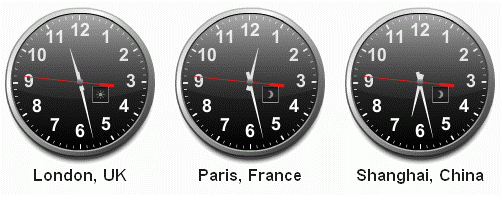
How to get TimeZone Offset in PHP

[caption id="attachment_768" align="alignnone" width="502"]timezone timezone[/caption]

[sourcecode language="php"]
function getOffsetByTimeZone($localTimeZone)
{
$time = new DateTime(date('Y-m-d H:i:s'), new DateTimeZone($localTimeZone));
$timezoneOffset = $time->format('P');
return $timezoneOffset;
}

[/sourcecode]

Call this function passing a local time zone as a string.
eg.
getOffsetByTimeZone('America/New_York');

Saturday, March 16, 2013

How to switch between Timezones in PHP

[caption id="attachment_768" align="alignnone" width="502"]timezone timezone[/caption]

[Extracted from : http://www.mindfiresolutions.com/PHP-function-for-Time-Zone-conversion-56.php]

Convert from GMT to a local timezone

[sourcecode language="php"]
function ConvertGMTToLocalTimezone($gmttime,$timezoneRequired)
{
$system_timezone = date_default_timezone_get();

date_default_timezone_set("GMT");
$gmt = date("Y-m-d h:i:s A");

$local_timezone = $timezoneRequired;
date_default_timezone_set($local_timezone);
$local = date("Y-m-d h:i:s A");

date_default_timezone_set($system_timezone);
$diff = (strtotime($local) - strtotime($gmt));

$date = new DateTime($gmttime);
$date->modify("+$diff seconds");
$timestamp = $date->format("Y-m-d h:i:s A");
return $timestamp;

}
[/sourcecode]

Convert from local timezone to GMT

[sourcecode language="php"]
function ConvertLocalTimezoneToGMT($gmttime,$timezoneRequired)
{
$system_timezone = date_default_timezone_get();

$local_timezone = $timezoneRequired;
date_default_timezone_set($local_timezone);
$local = date("Y-m-d h:i:s A");

date_default_timezone_set("GMT");
$gmt = date("Y-m-d h:i:s A");

date_default_timezone_set($system_timezone);
$diff = (strtotime($gmt) - strtotime($local));

$date = new DateTime($gmttime);
$date->modify("+$diff seconds");
$timestamp = $date->format("Y-m-d h:i:s A");
return $timestamp;
}

[/sourcecode]

Convert from one local timezone to another local timezone


[sourcecode language="php"]
function ConvertOneTimezoneToAnotherTimezone($time,$currentTimezone,$timezoneRequired)
{
$system_timezone = date_default_timezone_get();
$local_timezone = $currentTimezone;
date_default_timezone_set($local_timezone);
$local = date("Y-m-d h:i:s A");

date_default_timezone_set("GMT");
$gmt = date("Y-m-d h:i:s A");

$require_timezone = $timezoneRequired;
date_default_timezone_set($require_timezone);
$required = date("Y-m-d h:i:s A");

date_default_timezone_set($system_timezone);

$diff1 = (strtotime($gmt) - strtotime($local));
$diff2 = (strtotime($required) - strtotime($gmt));

$date = new DateTime($time);
$date->modify("+$diff1 seconds");
$date->modify("+$diff2 seconds");
$timestamp = $date->format("Y-m-d h:i:s A");
return $timestamp;
}
[/sourcecode]
[sourcecode language="php"]
echo ConvertGMTToLocalTimezone("2013-03-16 14:28:00","Asia/Seoul")."
";
echo ConvertLocalTimezoneToGMT("2013-03-16 14:28:00","Asia/Seoul")."
";
echo ConvertOneTimezoneToAnotherTimezone("2013-03-16 14:28:00","Asia/Seoul","Australia/South");
[/sourcecode]

Monday, March 4, 2013

Dealing with Time Zones in PHP/MySQL

[caption id="attachment_768" align="alignnone" width="502"]timezone timezone[/caption]

You might have experienced numerous problems when dealing with timezones. It is difficult to handle timezones when your web server and users are in different timezones. The condition become worse if the database server is in another timezone.

Let's see a simple way of storing date,time in database without messing up timezone related things. The datetime can be stored in GMT format without explicitly using a  specific timezone.

[sourcecode language="php"]
$gmtTime = gmdate("Y-m-d H:i:s", time());
[/sourcecode]

the timestamp value returned by time() function is stored in GMT format. This is neutral and can be stored in database without thinking timezone problems.

When querying data and make any date time comparisons you can convert it into a desired timezone using mysql built-in function CONVERT_TZ().

Following query can be used to retrive records added on a particular today with the consideration of a specific timezone.
This is based on 'America/Denver' timezone  ( -7:00).

[sourcecode language="php"]
SELECT *
FROM `audittrail`
WHERE date( CONVERT_TZ( datetime, '+0:00', '-7:00' ) ) = '2013-03-04 '

[/sourcecode]


Sunday, February 24, 2013

PHP Socket Programming Basics

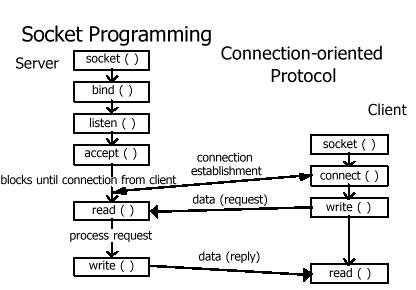
[caption id="attachment_764" align="aligncenter" width="416"]Socket Programming Socket Programming[/caption]

Welcome to Socket programming with PHP.

Before getting into this tutorial, you should know some bits about socket related network programming. If you know the theory  just skip this introduction.
To understand sockets, first think about client server architecture. The server is running one or more services and the clients thosewho require those services make requests to get those services. Clients can request a service from the server and get it only if there is a connection between them. In another way, server can listen for client requests and serve them if there 's a connection between them.
Then how a client can find a server on a network? On the internet each device is assigned a address called IP address to uniquely identify them. Therefore, if client knows the IP address of the server, he can find it. In the server, there may be multiple services running on different ports. So knowing only the IP address of the server does not help
reach the service. Client should know the exact port where the required service is running. Usually the server publishes its ports allocated for the services so that clients can connect. Most of them are under well-known ports which are in the range between 0 and 1023. While some ports are opened other ports are blocked for security concerns. Obviously port is a security hole where hackers might use for making a connection with the server

When combined  IP address with a port, it is a socket. A socket is one end-point of a two-way communication link between two programs running on the network.

There are two ways of socket programming in PHP. One is socket extension which is widely used and pretty common among PHP developers. PHP functions in this category starts with the prefix socket_ . The second method is using streams and these functions starts with stream_. In this tutorial we are using the first method as it's really simple.

The server read from the socket connection and read the message sent by client. The it writes the  reply to the socket connection and client gets the message from client's socket connection.

Creating the server

[sourcecode language="php"]
<?php
$host = "127.0.0.1";
$port = 25003;
$message = "Hello Client";
set_time_limit(0);
// create socket
$socket = socket_create(AF_INET, SOCK_STREAM, 0) or die("Could not create socket\n");
// bind socket to port
$result = socket_bind($socket, $host, $port) or die("Could not bind to socket\n");
// put server into passive state and listen for connections
$result = socket_listen($socket, 3) or die("Could not set up socket listener\n");

// accept incoming connections
$com = socket_accept($socket) or die("Could not accept incoming connection\n");
// read client input
$input = socket_read($com, 1024) or die("Could not read input\n");
// clean up input string
$input = trim($input);
echo "Client says: ".$input;
socket_write($com, $message , strlen ($message)) or die("Could not write output\n");
// close sockets
socket_close($com);
socket_close($socket);
?>
[/sourcecode]

Creating the client

[sourcecode language="php"]
<?php
$host    = "127.0.0.1";
$port    = 25003;
$message = "Hello Server";

// create socket
$socket = socket_create(AF_INET, SOCK_STREAM, 0) or die("Could not create socket\n");
// connect to server
$result = socket_connect($socket, $host, $port) or die ("Could not connect to server\n");
// send string to server
socket_write($socket, $message, strlen($message)) or die("Could not send data to server\n");
// get server response
$result = socket_read ($socket, 1024) or die("Could not read server response\n");
echo "Server  says :".$result;
// close socket
socket_close($socket);
?>


[/sourcecode]

How to enable CORS in Laravel 5

https://www.youtube.com/watch?v=PozYTvmgcVE 1. Add middleware php artisan make:middleware Cors return $next($request) ->header('Acces...