[sourcecode language="html"]
<!DOCTYPE html>
<html>
<head>
<script type="text/javascript" src="http://maps.google.com/maps/api/js?sensor=false"></script>
<script type="text/javascript" src="http://google-maps-utility-library-v3.googlecode.com/svn/trunk/infobox/src/infobox.js"></script>
<script type="text/javascript">
var ib = null;
var theMap = null;
function initialize() {
var latlng = new google.maps.LatLng(55.672962361614566, 12.56587028503418);
var myMapOptions = {
zoom: 15
,center: latlng
,mapTypeId: google.maps.MapTypeId.ROADMAP
,streetViewControl: false
};
theMap = new google.maps.Map(document.getElementById("map_canvas"), myMapOptions);
// namn
var name=[];
name.push('Test 1');
name.push('Test 2');
// positioner
var position=[];
position.push(new google.maps.LatLng(55.667093265894245,12.581255435943604));
position.push(new google.maps.LatLng(55.66453963191134, 12.584795951843262));
// infoboxes
var infobox = [];
infobox.push("<div>Hello 1</div>");
infobox.push("<div>Hello 2</div>");
ib = new InfoBox({});
for (i = 0; i < position.length; i += 1) {
// Call function
createMarkers(position[i], infobox[i], name[i]);
}
function createMarkers(position,content,name) {
// alert("createMarkers("+position+","+content+","+name+")");
var marker = new google.maps.Marker({
map: theMap,
draggable: false,
position: position,
visible: true,
title: name
});
var boxText = document.createElement("div");
boxText.style.cssText = "background: yellow; width: 300px; height: 70px; padding: 5px;";
boxText.innerHTML = content;
var myOptions = {
content: boxText
,disableAutoPan: false
,maxWidth: 0
,pixelOffset: new google.maps.Size(-37, -120)
,zIndex: null
,boxStyle: {
background: "url('tipbox.gif') no-repeat"
,opacity: 1
,width: "300px"
}
,closeBoxMargin: "5px 5px 5px 5px"
,closeBoxURL: "http://www.google.com/intl/en_us/mapfiles/close.gif"
,infoBoxClearance: new google.maps.Size(1, 1)
,isHidden: false
,pane: "floatPane"
,enableEventPropagation: false
};
google.maps.event.addListener(marker, "click", function (e) {
alert("click");
ib.setOptions(myOptions);
ib.open(theMap, this);
});
ib.open(theMap, marker);
ib.hide();
}
}
</script>
<title>Creating and Using an InfoBox</title>
</head>
<body onload="initialize()">
<div id="map_canvas" style="width: 100%; height: 400px"></div></body>
</html>
[/sourcecode]
Showing posts with label google map. Show all posts
Showing posts with label google map. Show all posts
Sunday, September 13, 2015

Monday, September 9, 2013
jQueryMobile with Google Map
[caption id="attachment_900" align="alignnone" width="336"] jQueryMobile with Google Map[/caption]
Demo
This demo is based on jQuery UI plugin for Google Maps.
[sourcecode language="javascript"]
<!doctype html>
<html lang="en">
<head>
<title>jQuery mobile with Google maps</title>
<link rel="stylesheet" href="http://code.jquery.com/mobile/1.2.0/jquery.mobile-1.2.0.min.css" />
<script src="http://code.jquery.com/jquery-1.8.2.min.js"></script>
<script src="http://code.jquery.com/mobile/1.2.0/jquery.mobile-1.2.0.min.js"></script>
<script type="text/javascript" src="http://maps.google.com/maps/api/js?v=3&sensor=false&language=en"> </script>
<script type="text/javascript" src="http://jquery-ui-map.googlecode.com/svn/trunk/ui/min/jquery.ui.map.min.js"></script>
<script type="text/javascript">
var colombo = new google.maps.LatLng(26.5727,73.8390);
var delhi = new google.maps.LatLng(28.6100,77.2300);
mobileDemo = { 'center': '28.6100,77.2300', 'zoom': 12 };
function initialize() {
$('#map_canvas').gmap({ 'center': mobileDemo.center, 'zoom': mobileDemo.zoom, 'disableDefaultUI':false });
$('#map_canvas').gmap('addMarker', { 'position': delhi } );
}
$(document).on("pageinit", "#basic-map", function() {
initialize();
});
$(document).on('click', '.add-markers', function(e) {
e.preventDefault();
$('#map_canvas').gmap('addMarker', { 'position': colombo } );
});
</script>
</head>
<body>
<div id="basic-map" data-role="page">
<div data-role="header">
<h1><a data-ajax="false" href="#">jQuery mobile with Google</a></h1>
<a data-rel="back">Back</a>
</div>
<div data-role="content">
<div style="padding:1em;">
<div id="map_canvas" style="height:350px;"></div>
</div>
<a href="#" data-role="button" data-theme="b">Add Some More Markers</a>
</div>
</div>
</body>
</html>
[/sourcecode]
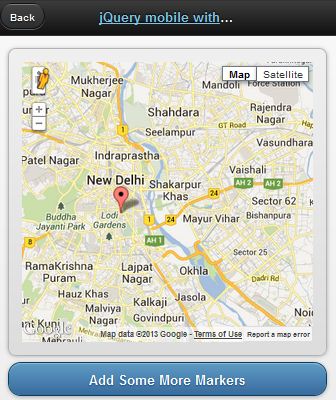 jQueryMobile with Google Map[/caption]
Demo
This demo is based on jQuery UI plugin for Google Maps.
[sourcecode language="javascript"]
<!doctype html>
<html lang="en">
<head>
<title>jQuery mobile with Google maps</title>
<link rel="stylesheet" href="http://code.jquery.com/mobile/1.2.0/jquery.mobile-1.2.0.min.css" />
<script src="http://code.jquery.com/jquery-1.8.2.min.js"></script>
<script src="http://code.jquery.com/mobile/1.2.0/jquery.mobile-1.2.0.min.js"></script>
<script type="text/javascript" src="http://maps.google.com/maps/api/js?v=3&sensor=false&language=en"> </script>
<script type="text/javascript" src="http://jquery-ui-map.googlecode.com/svn/trunk/ui/min/jquery.ui.map.min.js"></script>
<script type="text/javascript">
var colombo = new google.maps.LatLng(26.5727,73.8390);
var delhi = new google.maps.LatLng(28.6100,77.2300);
mobileDemo = { 'center': '28.6100,77.2300', 'zoom': 12 };
function initialize() {
$('#map_canvas').gmap({ 'center': mobileDemo.center, 'zoom': mobileDemo.zoom, 'disableDefaultUI':false });
$('#map_canvas').gmap('addMarker', { 'position': delhi } );
}
$(document).on("pageinit", "#basic-map", function() {
initialize();
});
$(document).on('click', '.add-markers', function(e) {
e.preventDefault();
$('#map_canvas').gmap('addMarker', { 'position': colombo } );
});
</script>
</head>
<body>
<div id="basic-map" data-role="page">
<div data-role="header">
<h1><a data-ajax="false" href="#">jQuery mobile with Google</a></h1>
<a data-rel="back">Back</a>
</div>
<div data-role="content">
<div style="padding:1em;">
<div id="map_canvas" style="height:350px;"></div>
</div>
<a href="#" data-role="button" data-theme="b">Add Some More Markers</a>
</div>
</div>
</body>
</html>
[/sourcecode]
Monday, May 13, 2013
Reverse Geocoding with Google Map API
[caption id="attachment_833" align="alignnone" width="499"] Reverse Geocoding[/caption]
Demo
If you know the latitude and longitude of a particular location, you can get the relevant address details such as city, state, region, country...etc. This process is known as Reverse Geocoding. In this post I 'm gonna show you how this could be achieved with famous Google Map API. This entire post is based on one API request. Look at below code.
[sourcecode language="javascript"]
http://maps.googleapis.com/maps/api/geocode/json?latlng=-37.814251,144.963169&sensor=false
[/sourcecode]
Enter above line in the browser bar to see a whole bunch of location details for the geographical point (-37.814251,144.963169) in lat lng format.
Pretty Simple. Here I'm using Google Map JavaScript API V3. All you need to do is to parse the json response to extract the information whatever you need.
[sourcecode language="javascript"]
jQuery.ajax({
url: 'http://maps.googleapis.com/maps/api/geocode/json?latlng=-37.814251,144.963169&sensor=false',
type: 'POST',
dataType: 'json',
success: function(data) {
if(data.status == 'OK')
{
alert(data.results[1].formatted_address);
alert(data.results[1].address_components[0].long_name);
alert(data.results[1].address_components[1].long_name);
}
},
error: function(xhr, textStatus, errorThrown) {
alert("Unable to resolve your location");
}
});
[/sourcecode]
 Reverse Geocoding[/caption]
Demo
If you know the latitude and longitude of a particular location, you can get the relevant address details such as city, state, region, country...etc. This process is known as Reverse Geocoding. In this post I 'm gonna show you how this could be achieved with famous Google Map API. This entire post is based on one API request. Look at below code.
[sourcecode language="javascript"]
http://maps.googleapis.com/maps/api/geocode/json?latlng=-37.814251,144.963169&sensor=false
[/sourcecode]
Enter above line in the browser bar to see a whole bunch of location details for the geographical point (-37.814251,144.963169) in lat lng format.
Pretty Simple. Here I'm using Google Map JavaScript API V3. All you need to do is to parse the json response to extract the information whatever you need.
[sourcecode language="javascript"]
jQuery.ajax({
url: 'http://maps.googleapis.com/maps/api/geocode/json?latlng=-37.814251,144.963169&sensor=false',
type: 'POST',
dataType: 'json',
success: function(data) {
if(data.status == 'OK')
{
alert(data.results[1].formatted_address);
alert(data.results[1].address_components[0].long_name);
alert(data.results[1].address_components[1].long_name);
}
},
error: function(xhr, textStatus, errorThrown) {
alert("Unable to resolve your location");
}
});
[/sourcecode]
Wednesday, April 24, 2013
Google Map Street View
[caption id="attachment_826" align="alignnone" width="277"] Google Map Street View[/caption]
Demo
[sourcecode language="javascript"]
<!DOCTYPE html>
<html>
<head>
<meta charset="<a>utf-8</a>">
<title>Street View service</title>
<link href="<a href="view-source:https://google-developers.appspot.com/maps/documentation/javascript/examples/default.css">/maps/documentation/javascript/examples/default.css</a>" rel="<a>stylesheet</a>">
<script src="<a href="view-source:https://maps.googleapis.com/maps/api/js?v=3.exp&sensor=false">https://maps.googleapis.com/maps/api/js?v=3.exp&sensor=false</a>"></script>
<script>
function initialize() {
var fenway = new google.maps.LatLng(42.345573,-71.098326);
var mapOptions = {
center: fenway,
zoom: 14,
mapTypeId: google.maps.MapTypeId.ROADMAP
};
var map = new google.maps.Map(
document.getElementById('map-canvas'), mapOptions);
var panoramaOptions = {
position: fenway,
pov: {
heading: 34,
pitch: 10
}
};
var panorama = new google.maps.StreetViewPanorama(document.getElementById('pano'),panoramaOptions);
map.setStreetView(panorama);
}
google.maps.event.addDomListener(window, 'load', initialize);
</script>
</head>
<body>
<div id="<a>map-canvas</a>" style="<a>width: 400px; height: 300px</a>"></div>
<div id="<a>pano</a>" style="<a>position:absolute; left:410px; top: 8px; width: 400px; height: 300px;</a>"></div>
</body>
</html>
[/sourcecode]
 Google Map Street View[/caption]
Demo
[sourcecode language="javascript"]
<!DOCTYPE html>
<html>
<head>
<meta charset="<a>utf-8</a>">
<title>Street View service</title>
<link href="<a href="view-source:https://google-developers.appspot.com/maps/documentation/javascript/examples/default.css">/maps/documentation/javascript/examples/default.css</a>" rel="<a>stylesheet</a>">
<script src="<a href="view-source:https://maps.googleapis.com/maps/api/js?v=3.exp&sensor=false">https://maps.googleapis.com/maps/api/js?v=3.exp&sensor=false</a>"></script>
<script>
function initialize() {
var fenway = new google.maps.LatLng(42.345573,-71.098326);
var mapOptions = {
center: fenway,
zoom: 14,
mapTypeId: google.maps.MapTypeId.ROADMAP
};
var map = new google.maps.Map(
document.getElementById('map-canvas'), mapOptions);
var panoramaOptions = {
position: fenway,
pov: {
heading: 34,
pitch: 10
}
};
var panorama = new google.maps.StreetViewPanorama(document.getElementById('pano'),panoramaOptions);
map.setStreetView(panorama);
}
google.maps.event.addDomListener(window, 'load', initialize);
</script>
</head>
<body>
<div id="<a>map-canvas</a>" style="<a>width: 400px; height: 300px</a>"></div>
<div id="<a>pano</a>" style="<a>position:absolute; left:410px; top: 8px; width: 400px; height: 300px;</a>"></div>
</body>
</html>
[/sourcecode]
Monday, July 9, 2012
Display Information Window in Google Map
Demo
[sourcecode language="html"]
<!DOCTYPE html PUBLIC "-//W3C//DTD XHTML 1.0 Strict//EN" "http://www.w3.org/TR/xhtml1/DTD/xhtml1-strict.dtd">
<html xmlns="http://www.w3.org/1999/xhtml" dir="ltr" lang="en" xml:lang="en">
<head>
<meta http-equiv="Content-Type" content="text/html; charset=utf-8" />
<title>codezone4 - Google Maps Simple Example</title>
<script src="http://ajax.googleapis.com/ajax/libs/jquery/1/jquery.min.js" type="text/javascript"></script>
<script type="text/javascript" src="http://maps.google.com/maps/api/js?sensor=false"></script>
<script type="text/javascript">
function initialize()
{
var latlng = new google.maps.LatLng(9.931544168615512,76.27632894178791);
var opt =
{
center:latlng,
zoom:10,
mapTypeId: google.maps.MapTypeId.ROADMAP,
disableAutoPan:false,
navigationControl:true,
navigationControlOptions: {style:google.maps.NavigationControlStyle.SMALL },
mapTypeControl:true,
mapTypeControlOptions: {style:google.maps.MapTypeControlStyle.DROPDOWN_MENU}
};
var map = new google.maps.Map(document.getElementById("map"),opt);
var marker= new google.maps.Marker({
position: new google.maps.LatLng(6.9167,79.8333),
title: "codeZone4 Base",
clickable: true,
map: map
});
var infowindow = new google.maps.InfoWindow(
{
content: " We are here! "
});
google.maps.event.addListener(marker,'click',function(){
infowindow.open(map,marker);
});
}
</script>
</head>
<body onload="initialize()">
<div id="map" style="width:400px;height:300px;margin-top:10px;"></div>
</body>
</html>
[/sourcecode]
[sourcecode language="html"]
<!DOCTYPE html PUBLIC "-//W3C//DTD XHTML 1.0 Strict//EN" "http://www.w3.org/TR/xhtml1/DTD/xhtml1-strict.dtd">
<html xmlns="http://www.w3.org/1999/xhtml" dir="ltr" lang="en" xml:lang="en">
<head>
<meta http-equiv="Content-Type" content="text/html; charset=utf-8" />
<title>codezone4 - Google Maps Simple Example</title>
<script src="http://ajax.googleapis.com/ajax/libs/jquery/1/jquery.min.js" type="text/javascript"></script>
<script type="text/javascript" src="http://maps.google.com/maps/api/js?sensor=false"></script>
<script type="text/javascript">
function initialize()
{
var latlng = new google.maps.LatLng(9.931544168615512,76.27632894178791);
var opt =
{
center:latlng,
zoom:10,
mapTypeId: google.maps.MapTypeId.ROADMAP,
disableAutoPan:false,
navigationControl:true,
navigationControlOptions: {style:google.maps.NavigationControlStyle.SMALL },
mapTypeControl:true,
mapTypeControlOptions: {style:google.maps.MapTypeControlStyle.DROPDOWN_MENU}
};
var map = new google.maps.Map(document.getElementById("map"),opt);
var marker= new google.maps.Marker({
position: new google.maps.LatLng(6.9167,79.8333),
title: "codeZone4 Base",
clickable: true,
map: map
});
var infowindow = new google.maps.InfoWindow(
{
content: " We are here! "
});
google.maps.event.addListener(marker,'click',function(){
infowindow.open(map,marker);
});
}
</script>
</head>
<body onload="initialize()">
<div id="map" style="width:400px;height:300px;margin-top:10px;"></div>
</body>
</html>
[/sourcecode]
Thursday, April 19, 2012
HTML5 Geolocation
Demo Download
[sourcecode language="javascript"]
<!DOCTYPE html>
<html>
<head>
<script src="<a href="view-source:http://maps.googleapis.com/maps/api/js?sensor=false">http://maps.googleapis.com/maps/api/js?sensor=false</a>"></script>
<script>
// Integration with google maps
function loadMap(lat, lng) {
var latlng = new google.maps.LatLng(lat, lng);
var settings = {
zoom: 14,
center: latlng,
mapTypeId: google.maps.MapTypeId.ROADMAP
};
var map = new google.maps.Map(document.getElementById('map_canvas'), settings);
var marker = new google.maps.Marker({
position: latlng,
map: map,
title: 'Your Position!'
});
document.getElementById('status').innerHTML = 'Position Found!';
}
// Initialize geolocation
function initialize() {
if (navigator.geolocation) {
document.getElementById('status').innerHTML = 'Checking...';
navigator.geolocation.getCurrentPosition(
onSuccess,
onError, {
enableHighAccuracy: true,
timeout: 20000,
maximumAge: 120000
});
}
else {
document.getElementById('status').innerHTML = 'Geolocation not supported.';
}
}
// Map position retrieved successfully
function onSuccess(position) {
var data = '';
data += 'latitude: ' + position.coords.latitude + '<br/>';
data += 'longitude: ' + position.coords.longitude + '<br/>';
data += 'altitude: ' + position.coords.altitude + '<br/>';
data += 'accuracy: ' + position.coords.accuracy + '<br/>';
data += 'altitudeAccuracy: ' + position.coords.altitudeAccuracy + '<br/>';
data += 'heading: ' + position.coords.heading + '<br/>';
data += 'speed: ' + position.coords.speed + '<br/>';
document.getElementById('data').innerHTML = data;
loadMap(position.coords.latitude, position.coords.longitude);
}
// Error handler
function onError(err) {
var message;
switch (err.code) {
case 0:
message = 'Unknown error: ' + err.message;
break;
case 1:
message = 'You denied permission to retrieve a position.';
break;
case 2:
message = 'The browser was unable to determine a position: ' + error.message;
break;
case 3:
message = 'The browser timed out before retrieving the position.';
break;
}
document.getElementById('status').innerHTML = message;
}
</script>
</head>
<body onload="<a>initialize()</a>">
<div id="<a>status</a>"></div>
<div id="<a>data</a>"></div>
<div id="<a>map_canvas</a>" style="<a>width: 640px; height: 480px</a>"></div>
</body>
</html>
[/sourcecode]
[sourcecode language="javascript"]
<!DOCTYPE html>
<html>
<head>
<script src="<a href="view-source:http://maps.googleapis.com/maps/api/js?sensor=false">http://maps.googleapis.com/maps/api/js?sensor=false</a>"></script>
<script>
// Integration with google maps
function loadMap(lat, lng) {
var latlng = new google.maps.LatLng(lat, lng);
var settings = {
zoom: 14,
center: latlng,
mapTypeId: google.maps.MapTypeId.ROADMAP
};
var map = new google.maps.Map(document.getElementById('map_canvas'), settings);
var marker = new google.maps.Marker({
position: latlng,
map: map,
title: 'Your Position!'
});
document.getElementById('status').innerHTML = 'Position Found!';
}
// Initialize geolocation
function initialize() {
if (navigator.geolocation) {
document.getElementById('status').innerHTML = 'Checking...';
navigator.geolocation.getCurrentPosition(
onSuccess,
onError, {
enableHighAccuracy: true,
timeout: 20000,
maximumAge: 120000
});
}
else {
document.getElementById('status').innerHTML = 'Geolocation not supported.';
}
}
// Map position retrieved successfully
function onSuccess(position) {
var data = '';
data += 'latitude: ' + position.coords.latitude + '<br/>';
data += 'longitude: ' + position.coords.longitude + '<br/>';
data += 'altitude: ' + position.coords.altitude + '<br/>';
data += 'accuracy: ' + position.coords.accuracy + '<br/>';
data += 'altitudeAccuracy: ' + position.coords.altitudeAccuracy + '<br/>';
data += 'heading: ' + position.coords.heading + '<br/>';
data += 'speed: ' + position.coords.speed + '<br/>';
document.getElementById('data').innerHTML = data;
loadMap(position.coords.latitude, position.coords.longitude);
}
// Error handler
function onError(err) {
var message;
switch (err.code) {
case 0:
message = 'Unknown error: ' + err.message;
break;
case 1:
message = 'You denied permission to retrieve a position.';
break;
case 2:
message = 'The browser was unable to determine a position: ' + error.message;
break;
case 3:
message = 'The browser timed out before retrieving the position.';
break;
}
document.getElementById('status').innerHTML = message;
}
</script>
</head>
<body onload="<a>initialize()</a>">
<div id="<a>status</a>"></div>
<div id="<a>data</a>"></div>
<div id="<a>map_canvas</a>" style="<a>width: 640px; height: 480px</a>"></div>
</body>
</html>
[/sourcecode]
Calculate Distance between two points, Get Driving Time - Advanced Distance Finder Tutorial
So you need to find distance between two places on the map and the shortest route. You need to get the driving time between these places
Demo Download
[sourcecode language="javascript"]
<html>
<head>
<title>Distance finder</title>
<meta type="<a>description</a>" content="<a>Find the distance between two .</a>"/>
<script type="<a>text/javascript</a>" src="<a href="view-source:http://maps.google.com/maps/api/js?sensor=true">http://maps.google.com/maps/api/js?sensor=true</a>"></script>
<script type="<a>text/javascript</a>">
var location1;
var location2;
var address1;
var address2;
var latlng;
var geocoder;
var map;
var distance;
// finds the coordinates for the two locations and calls the showMap() function
function initialize()
{
geocoder = new google.maps.Geocoder(); // creating a new geocode object
// getting the two address values
address1 = document.getElementById("address1").value;
address2 = document.getElementById("address2").value;
// finding out the coordinates
if (geocoder)
{
geocoder.geocode( { 'address': address1}, function(results, status)
{
if (status == google.maps.GeocoderStatus.OK)
{
//location of first address (latitude + longitude)
location1 = results[0].geometry.location;
} else
{
alert("Geocode was not successful for the following reason: " + status);
}
});
geocoder.geocode( { 'address': address2}, function(results, status)
{
if (status == google.maps.GeocoderStatus.OK)
{
//location of second address (latitude + longitude)
location2 = results[0].geometry.location;
// calling the showMap() function to create and show the map
showMap();
} else
{
alert("Geocode was not successful for the following reason: " + status);
}
});
}
}
// creates and shows the map
function showMap()
{
// center of the map (compute the mean value between the two locations)
latlng = new google.maps.LatLng((location1.lat()+location2.lat())/2,(location1.lng()+location2.lng())/2);
// set map options
// set zoom level
// set center
// map type
var mapOptions =
{
zoom: 1,
center: latlng,
mapTypeId: google.maps.MapTypeId.HYBRID
};
// create a new map object
// set the div id where it will be shown
// set the map options
map = new google.maps.Map(document.getElementById("map_canvas"), mapOptions);
// show route between the points
directionsService = new google.maps.DirectionsService();
directionsDisplay = new google.maps.DirectionsRenderer(
{
suppressMarkers: true,
suppressInfoWindows: true
});
directionsDisplay.setMap(map);
var request = {
origin:location1,
destination:location2,
travelMode: google.maps.DirectionsTravelMode.DRIVING
};
directionsService.route(request, function(response, status)
{
if (status == google.maps.DirectionsStatus.OK)
{
directionsDisplay.setDirections(response);
distance = "The distance between the two points on the chosen route is: "+response.routes[0].legs[0].distance.text;
distance += "<br/>The aproximative driving time is: "+response.routes[0].legs[0].duration.text;
document.getElementById("distance_road").innerHTML = distance;
}
});
// show a line between the two points
var line = new google.maps.Polyline({
map: map,
path: [location1, location2],
strokeWeight: 7,
strokeOpacity: 0.8,
strokeColor: "#FFAA00"
});
// create the markers for the two locations
var marker1 = new google.maps.Marker({
map: map,
position: location1,
title: "First location"
});
var marker2 = new google.maps.Marker({
map: map,
position: location2,
title: "Second location"
});
// create the text to be shown in the infowindows
var text1 = '<div id="content">'+
'<h1 id="firstHeading">First location</h1>'+
'<div id="bodyContent">'+
'<p>Coordinates: '+location1+'</p>'+
'<p>Address: '+address1+'</p>'+
'</div>'+
'</div>';
var text2 = '<div id="content">'+
'<h1 id="firstHeading">Second location</h1>'+
'<div id="bodyContent">'+
'<p>Coordinates: '+location2+'</p>'+
'<p>Address: '+address2+'</p>'+
'</div>'+
'</div>';
// create info boxes for the two markers
var infowindow1 = new google.maps.InfoWindow({
content: text1
});
var infowindow2 = new google.maps.InfoWindow({
content: text2
});
// add action events so the info windows will be shown when the marker is clicked
google.maps.event.addListener(marker1, 'click', function() {
infowindow1.open(map,marker1);
});
google.maps.event.addListener(marker2, 'click', function() {
infowindow2.open(map,marker1);
});
// compute distance between the two points
var R = 6371;
var dLat = toRad(location2.lat()-location1.lat());
var dLon = toRad(location2.lng()-location1.lng());
var dLat1 = toRad(location1.lat());
var dLat2 = toRad(location2.lat());
var a = Math.sin(dLat/2) * Math.sin(dLat/2) +
Math.cos(dLat1) * Math.cos(dLat1) *
Math.sin(dLon/2) * Math.sin(dLon/2);
var c = 2 * Math.atan2(Math.sqrt(a), Math.sqrt(1-a));
var d = R * c;
document.getElementById("distance_direct").innerHTML = "<br/>The distance between the two points (in a straight line) is: "+d;
}
function toRad(deg)
{
return deg * Math.PI/180;
}
</script>
</head>
<body bgcolor="<a>#eeeeee</a>">
<div id="<a>form</a>" style="<a>width:100%; height:20%</a>">
<table align="<a>center</a>" valign="<a>center</a>">
<tr>
<td colspan="<a>7</a>" align="<a>center</a>"><b>Find the distance between two locations</b></td>
</tr>
<tr>
<td colspan="<a>7</a>"> </td>
</tr>
<tr>
<td>First address:</td>
<td> </td>
<td><input type="<a>text</a>" name="<a>address1</a>" id="<a>address1</a>" size="<a>50</a>"/></td>
<td> </td>
<td>Second address:</td>
<td> </td>
<td><input type="<a>text</a>" name="<a>address2</a>" id="<a>address2</a>" size="<a>50</a>"/></td>
</tr>
<tr>
<td colspan="<a>7</a>"> </td>
</tr>
<tr>
<td colspan="<a>7</a>" align="<a>center</a>"><input type="<a>button</a>" value="<a>Show</a>" onclick="<a>initialize();</a>"/></td>
</tr>
</table>
</div>
<center><div style="<a>width:100%; height:10%</a>" id="<a>distance_direct</a>"></div></center>
<center><div style="<a>width:100%; height:10%</a>" id="<a>distance_road</a>"></div></center>
<center><div id="<a>map_canvas</a>" style="<a>width:70%; height:54%</a>"></div></center>
</body>
</html>
[/sourcecode]
Demo Download
[sourcecode language="javascript"]
<html>
<head>
<title>Distance finder</title>
<meta type="<a>description</a>" content="<a>Find the distance between two .</a>"/>
<script type="<a>text/javascript</a>" src="<a href="view-source:http://maps.google.com/maps/api/js?sensor=true">http://maps.google.com/maps/api/js?sensor=true</a>"></script>
<script type="<a>text/javascript</a>">
var location1;
var location2;
var address1;
var address2;
var latlng;
var geocoder;
var map;
var distance;
// finds the coordinates for the two locations and calls the showMap() function
function initialize()
{
geocoder = new google.maps.Geocoder(); // creating a new geocode object
// getting the two address values
address1 = document.getElementById("address1").value;
address2 = document.getElementById("address2").value;
// finding out the coordinates
if (geocoder)
{
geocoder.geocode( { 'address': address1}, function(results, status)
{
if (status == google.maps.GeocoderStatus.OK)
{
//location of first address (latitude + longitude)
location1 = results[0].geometry.location;
} else
{
alert("Geocode was not successful for the following reason: " + status);
}
});
geocoder.geocode( { 'address': address2}, function(results, status)
{
if (status == google.maps.GeocoderStatus.OK)
{
//location of second address (latitude + longitude)
location2 = results[0].geometry.location;
// calling the showMap() function to create and show the map
showMap();
} else
{
alert("Geocode was not successful for the following reason: " + status);
}
});
}
}
// creates and shows the map
function showMap()
{
// center of the map (compute the mean value between the two locations)
latlng = new google.maps.LatLng((location1.lat()+location2.lat())/2,(location1.lng()+location2.lng())/2);
// set map options
// set zoom level
// set center
// map type
var mapOptions =
{
zoom: 1,
center: latlng,
mapTypeId: google.maps.MapTypeId.HYBRID
};
// create a new map object
// set the div id where it will be shown
// set the map options
map = new google.maps.Map(document.getElementById("map_canvas"), mapOptions);
// show route between the points
directionsService = new google.maps.DirectionsService();
directionsDisplay = new google.maps.DirectionsRenderer(
{
suppressMarkers: true,
suppressInfoWindows: true
});
directionsDisplay.setMap(map);
var request = {
origin:location1,
destination:location2,
travelMode: google.maps.DirectionsTravelMode.DRIVING
};
directionsService.route(request, function(response, status)
{
if (status == google.maps.DirectionsStatus.OK)
{
directionsDisplay.setDirections(response);
distance = "The distance between the two points on the chosen route is: "+response.routes[0].legs[0].distance.text;
distance += "<br/>The aproximative driving time is: "+response.routes[0].legs[0].duration.text;
document.getElementById("distance_road").innerHTML = distance;
}
});
// show a line between the two points
var line = new google.maps.Polyline({
map: map,
path: [location1, location2],
strokeWeight: 7,
strokeOpacity: 0.8,
strokeColor: "#FFAA00"
});
// create the markers for the two locations
var marker1 = new google.maps.Marker({
map: map,
position: location1,
title: "First location"
});
var marker2 = new google.maps.Marker({
map: map,
position: location2,
title: "Second location"
});
// create the text to be shown in the infowindows
var text1 = '<div id="content">'+
'<h1 id="firstHeading">First location</h1>'+
'<div id="bodyContent">'+
'<p>Coordinates: '+location1+'</p>'+
'<p>Address: '+address1+'</p>'+
'</div>'+
'</div>';
var text2 = '<div id="content">'+
'<h1 id="firstHeading">Second location</h1>'+
'<div id="bodyContent">'+
'<p>Coordinates: '+location2+'</p>'+
'<p>Address: '+address2+'</p>'+
'</div>'+
'</div>';
// create info boxes for the two markers
var infowindow1 = new google.maps.InfoWindow({
content: text1
});
var infowindow2 = new google.maps.InfoWindow({
content: text2
});
// add action events so the info windows will be shown when the marker is clicked
google.maps.event.addListener(marker1, 'click', function() {
infowindow1.open(map,marker1);
});
google.maps.event.addListener(marker2, 'click', function() {
infowindow2.open(map,marker1);
});
// compute distance between the two points
var R = 6371;
var dLat = toRad(location2.lat()-location1.lat());
var dLon = toRad(location2.lng()-location1.lng());
var dLat1 = toRad(location1.lat());
var dLat2 = toRad(location2.lat());
var a = Math.sin(dLat/2) * Math.sin(dLat/2) +
Math.cos(dLat1) * Math.cos(dLat1) *
Math.sin(dLon/2) * Math.sin(dLon/2);
var c = 2 * Math.atan2(Math.sqrt(a), Math.sqrt(1-a));
var d = R * c;
document.getElementById("distance_direct").innerHTML = "<br/>The distance between the two points (in a straight line) is: "+d;
}
function toRad(deg)
{
return deg * Math.PI/180;
}
</script>
</head>
<body bgcolor="<a>#eeeeee</a>">
<div id="<a>form</a>" style="<a>width:100%; height:20%</a>">
<table align="<a>center</a>" valign="<a>center</a>">
<tr>
<td colspan="<a>7</a>" align="<a>center</a>"><b>Find the distance between two locations</b></td>
</tr>
<tr>
<td colspan="<a>7</a>"> </td>
</tr>
<tr>
<td>First address:</td>
<td> </td>
<td><input type="<a>text</a>" name="<a>address1</a>" id="<a>address1</a>" size="<a>50</a>"/></td>
<td> </td>
<td>Second address:</td>
<td> </td>
<td><input type="<a>text</a>" name="<a>address2</a>" id="<a>address2</a>" size="<a>50</a>"/></td>
</tr>
<tr>
<td colspan="<a>7</a>"> </td>
</tr>
<tr>
<td colspan="<a>7</a>" align="<a>center</a>"><input type="<a>button</a>" value="<a>Show</a>" onclick="<a>initialize();</a>"/></td>
</tr>
</table>
</div>
<center><div style="<a>width:100%; height:10%</a>" id="<a>distance_direct</a>"></div></center>
<center><div style="<a>width:100%; height:10%</a>" id="<a>distance_road</a>"></div></center>
<center><div id="<a>map_canvas</a>" style="<a>width:70%; height:54%</a>"></div></center>
</body>
</html>
[/sourcecode]
Calculate distance - Distance Finder Tutorial
This tutorial demonstrates how to calculate distance between two locations.
Try with your Google Map API key.
Demo Download
Here is the complete source code.
[sourcecode language="javascript"]
<!DOCTYPE html PUBLIC "-//W3C//DTD XHTML 1.0 Strict//EN"
"http://www.w3.org/TR/xhtml1/DTD/xhtml1-strict.dtd">
<html xmlns="http://www.w3.org/1999/xhtml">
<head>
<meta http-equiv="content-type" content="text/html; charset=UTF-8"/>
<title>Calculate distance with Google Maps API</title>
<script src="http://maps.google.com/maps?file=api&v=2&key=YOUR_GOOGLE_MAP_API_KEY" type="text/javascript"></script>
<!-- According to the Google Maps API Terms of Service you are required display a Google map when using the Google Maps API. see: http://code.google.com/apis/maps/terms.html -->
<script type="text/javascript">
var geocoder, location1, location2;
function initialize() {
geocoder = new GClientGeocoder();
}
function showLocation() {
geocoder.getLocations(document.forms[0].address1.value, function (response) {
if (!response || response.Status.code != 200)
{
alert("Sorry, we were unable to geocode the first address");
}
else
{
location1 = {lat: response.Placemark[0].Point.coordinates[1], lon: response.Placemark[0].Point.coordinates[0], address: response.Placemark[0].address};
geocoder.getLocations(document.forms[0].address2.value, function (response) {
if (!response || response.Status.code != 200)
{
alert("Sorry, we were unable to geocode the second address");
}
else
{
location2 = {lat: response.Placemark[0].Point.coordinates[1], lon: response.Placemark[0].Point.coordinates[0], address: response.Placemark[0].address};
calculateDistance();
}
});
}
});
}
function calculateDistance()
{
try
{
var glatlng1 = new GLatLng(location1.lat, location1.lon);
var glatlng2 = new GLatLng(location2.lat, location2.lon);
var miledistance = glatlng1.distanceFrom(glatlng2, 3959).toFixed(1);
var kmdistance = (miledistance * 1.609344).toFixed(1);
document.getElementById('results').innerHTML = '<strong>Address 1: </strong>' + location1.address + ' (' + location1.lat + ':' + location1.lon + ')<br /><strong>Address 2: </strong>' + location2.address + ' (' + location2.lat + ':' + location2.lon + ')<br /><strong>Distance: </strong>' + miledistance + ' miles (or ' + kmdistance + ' kilometers)';
}
catch (error)
{
alert(error);
}
}
</script>
</head>
<body onload="initialize()">
<form action="#" onsubmit="showLocation(); return false;">
<p>
<input type="text" name="address1" value="Address 1" class="address_input" size="40" />
<input type="text" name="address2" value="Address 2" class="address_input" size="40" />
<input type="submit" name="find" value="Search" />
</p>
</form>
<p id="results"></p>
</body>
</html>
<!-- Hosting24 Analytics Code -->
<script type="text/javascript" src="http://stats.hosting24.com/count.php"></script>
<!-- End Of Analytics Code -->
[/sourcecode]
Try with your Google Map API key.
Demo Download
Here is the complete source code.
[sourcecode language="javascript"]
<!DOCTYPE html PUBLIC "-//W3C//DTD XHTML 1.0 Strict//EN"
"http://www.w3.org/TR/xhtml1/DTD/xhtml1-strict.dtd">
<html xmlns="http://www.w3.org/1999/xhtml">
<head>
<meta http-equiv="content-type" content="text/html; charset=UTF-8"/>
<title>Calculate distance with Google Maps API</title>
<script src="http://maps.google.com/maps?file=api&v=2&key=YOUR_GOOGLE_MAP_API_KEY" type="text/javascript"></script>
<!-- According to the Google Maps API Terms of Service you are required display a Google map when using the Google Maps API. see: http://code.google.com/apis/maps/terms.html -->
<script type="text/javascript">
var geocoder, location1, location2;
function initialize() {
geocoder = new GClientGeocoder();
}
function showLocation() {
geocoder.getLocations(document.forms[0].address1.value, function (response) {
if (!response || response.Status.code != 200)
{
alert("Sorry, we were unable to geocode the first address");
}
else
{
location1 = {lat: response.Placemark[0].Point.coordinates[1], lon: response.Placemark[0].Point.coordinates[0], address: response.Placemark[0].address};
geocoder.getLocations(document.forms[0].address2.value, function (response) {
if (!response || response.Status.code != 200)
{
alert("Sorry, we were unable to geocode the second address");
}
else
{
location2 = {lat: response.Placemark[0].Point.coordinates[1], lon: response.Placemark[0].Point.coordinates[0], address: response.Placemark[0].address};
calculateDistance();
}
});
}
});
}
function calculateDistance()
{
try
{
var glatlng1 = new GLatLng(location1.lat, location1.lon);
var glatlng2 = new GLatLng(location2.lat, location2.lon);
var miledistance = glatlng1.distanceFrom(glatlng2, 3959).toFixed(1);
var kmdistance = (miledistance * 1.609344).toFixed(1);
document.getElementById('results').innerHTML = '<strong>Address 1: </strong>' + location1.address + ' (' + location1.lat + ':' + location1.lon + ')<br /><strong>Address 2: </strong>' + location2.address + ' (' + location2.lat + ':' + location2.lon + ')<br /><strong>Distance: </strong>' + miledistance + ' miles (or ' + kmdistance + ' kilometers)';
}
catch (error)
{
alert(error);
}
}
</script>
</head>
<body onload="initialize()">
<form action="#" onsubmit="showLocation(); return false;">
<p>
<input type="text" name="address1" value="Address 1" class="address_input" size="40" />
<input type="text" name="address2" value="Address 2" class="address_input" size="40" />
<input type="submit" name="find" value="Search" />
</p>
</form>
<p id="results"></p>
</body>
</html>
<!-- Hosting24 Analytics Code -->
<script type="text/javascript" src="http://stats.hosting24.com/count.php"></script>
<!-- End Of Analytics Code -->
[/sourcecode]
Get distance from the current location
This tutorial demonstrates how to calculate distance to the specified destination from your location.
Demo Download
Here is the complete source code.
[sourcecode language="javascript"]
<!DOCTYPE html PUBLIC "-//W3C//DTD XHTML 1.0 Transitional//EN" "http://www.w3.org/TR/xhtml1/DTD/xhtml1-transitional.dtd">
<html xmlns="http://www.w3.org/1999/xhtml">
<head>
<meta http-equiv="Content-Type" content="text/html; charset=utf-8" />
<title>Untitled Document</title>
<script src="jquery-1.7.js"></script>
<script src="http://maps.google.com/maps/api/js?sensor=false"></script>
<script src="http://j.maxmind.com/app/geoip.js"></script>
<script type="text/javascript">
var directionRenderer;
var directionsService = new google.maps.DirectionsService();
var map;
$(document).ready(function () {
// Set up map starting point for Google Maps.
// Set initial coords to latitude 7 and longitude 81, which is somewhere
// around Kansas City in the center of the US, and then set the zoom to 4
// so the entire US is visible and centered.
var kansas = new google.maps.LatLng(81,7);
var myOptions = {
zoom: 4,
mapTypeId: google.maps.MapTypeId.ROADMAP,
center: kansas
}
map = new google.maps.Map(document.getElementById("map"), myOptions);
directionsRenderer = new google.maps.DirectionsRenderer();
directionsRenderer.setMap(map);
// wire up button click
$('#go').click(function () {
// Use our new getLatLng with fallback and define an inline function to
// handle the callback.
getLatLng(function (latitude, longitude, isMaxMind) {
// set the starting point
var start = new google.maps.LatLng(latitude, longitude);
// get the address the user entered
var address = $('#address').val();
if (address) {
// set end point
var end = $('#address').val();
// set the request options
var request = {
origin: start,
destination: end,
travelMode: google.maps.DirectionsTravelMode.DRIVING
};
// make the directions request
directionsService.route(request, function (result, status) {
if (status == google.maps.DirectionsStatus.OK) {
// Display the directions using Google's Directions
// Renderer.
directionsRenderer.setDirections(result);
// output total distance separately
var distance = getTotalDistance(result);
// output either miles or km
var units = $('#units').val();
if (units == 'IMPERIAL') {
$('#distance').html('Total Distance: <strong>' +
metersToMiles(distance) + '</strong> miles');
} else {
$('#distance').html('Total Distance: <strong>' +
metersToKilometers(distance) + '</strong> km');
}
} else {
error("Directions failed due to: " + status);
}
});
}
else {
error('Please enter an address');
}
// if we used MaxMind for location, add attribution link
if (isMaxMind) {
$('body').append('<p><a href="http://www.maxmind.com" target="_blank">IP to Location Service Provided by MaxMind</a></p>');
}
});
});
});
function getLatLng(callback) {
// test for presence of geolocation
if (navigator && navigator.geolocation) {
// make the request for the user's position
navigator.geolocation.getCurrentPosition(function (position) {
// success handler
callback(position.coords.latitude, position.coords.longitude);
},
function (err) {
// handle the error by passing the callback the location from MaxMind
callback(geoip_latitude(), geoip_longitude(), true);
});
} else {
// geolocation not available, so pass the callback the location from
// MaxMind
callback(geoip_latitude(), geoip_longitude(), true);
}
}
// return total distance in meters
function getTotalDistance(result) {
var meters = 0;
var route = result.routes[0];
for (ii = 0; ii < route.legs.length; ii++) {
// Google stores distance value in meters
meters += route.legs[ii].distance.value;
}
return meters;
}
function metersToKilometers(meters) {
return Math.round(meters / 1000);
}
function metersToMiles(meters) {
// 1 mile = 1609.344 meters
return Math.round(meters / 1609.344);
}
function error(msg) {
alert(msg);
}
</script>
</head>
<body>
<div>
<label for="address">Enter a Destination Address:</label>
<input type="text" id="address" />
</div>
<div>
<label for="units">Units:</label>
<select id="units">
<option value="IMPERIAL">Miles</option>
<option value="METRIC">Kilometers</option>
</select>
</div>
<div>
<input type="button" id="go" value="Get Directions" />
</div>
<div id="distance"></div>
<div id="map"></div>
</body>
</html>
[/sourcecode]
Demo Download
Here is the complete source code.
[sourcecode language="javascript"]
<!DOCTYPE html PUBLIC "-//W3C//DTD XHTML 1.0 Transitional//EN" "http://www.w3.org/TR/xhtml1/DTD/xhtml1-transitional.dtd">
<html xmlns="http://www.w3.org/1999/xhtml">
<head>
<meta http-equiv="Content-Type" content="text/html; charset=utf-8" />
<title>Untitled Document</title>
<script src="jquery-1.7.js"></script>
<script src="http://maps.google.com/maps/api/js?sensor=false"></script>
<script src="http://j.maxmind.com/app/geoip.js"></script>
<script type="text/javascript">
var directionRenderer;
var directionsService = new google.maps.DirectionsService();
var map;
$(document).ready(function () {
// Set up map starting point for Google Maps.
// Set initial coords to latitude 7 and longitude 81, which is somewhere
// around Kansas City in the center of the US, and then set the zoom to 4
// so the entire US is visible and centered.
var kansas = new google.maps.LatLng(81,7);
var myOptions = {
zoom: 4,
mapTypeId: google.maps.MapTypeId.ROADMAP,
center: kansas
}
map = new google.maps.Map(document.getElementById("map"), myOptions);
directionsRenderer = new google.maps.DirectionsRenderer();
directionsRenderer.setMap(map);
// wire up button click
$('#go').click(function () {
// Use our new getLatLng with fallback and define an inline function to
// handle the callback.
getLatLng(function (latitude, longitude, isMaxMind) {
// set the starting point
var start = new google.maps.LatLng(latitude, longitude);
// get the address the user entered
var address = $('#address').val();
if (address) {
// set end point
var end = $('#address').val();
// set the request options
var request = {
origin: start,
destination: end,
travelMode: google.maps.DirectionsTravelMode.DRIVING
};
// make the directions request
directionsService.route(request, function (result, status) {
if (status == google.maps.DirectionsStatus.OK) {
// Display the directions using Google's Directions
// Renderer.
directionsRenderer.setDirections(result);
// output total distance separately
var distance = getTotalDistance(result);
// output either miles or km
var units = $('#units').val();
if (units == 'IMPERIAL') {
$('#distance').html('Total Distance: <strong>' +
metersToMiles(distance) + '</strong> miles');
} else {
$('#distance').html('Total Distance: <strong>' +
metersToKilometers(distance) + '</strong> km');
}
} else {
error("Directions failed due to: " + status);
}
});
}
else {
error('Please enter an address');
}
// if we used MaxMind for location, add attribution link
if (isMaxMind) {
$('body').append('<p><a href="http://www.maxmind.com" target="_blank">IP to Location Service Provided by MaxMind</a></p>');
}
});
});
});
function getLatLng(callback) {
// test for presence of geolocation
if (navigator && navigator.geolocation) {
// make the request for the user's position
navigator.geolocation.getCurrentPosition(function (position) {
// success handler
callback(position.coords.latitude, position.coords.longitude);
},
function (err) {
// handle the error by passing the callback the location from MaxMind
callback(geoip_latitude(), geoip_longitude(), true);
});
} else {
// geolocation not available, so pass the callback the location from
// MaxMind
callback(geoip_latitude(), geoip_longitude(), true);
}
}
// return total distance in meters
function getTotalDistance(result) {
var meters = 0;
var route = result.routes[0];
for (ii = 0; ii < route.legs.length; ii++) {
// Google stores distance value in meters
meters += route.legs[ii].distance.value;
}
return meters;
}
function metersToKilometers(meters) {
return Math.round(meters / 1000);
}
function metersToMiles(meters) {
// 1 mile = 1609.344 meters
return Math.round(meters / 1609.344);
}
function error(msg) {
alert(msg);
}
</script>
</head>
<body>
<div>
<label for="address">Enter a Destination Address:</label>
<input type="text" id="address" />
</div>
<div>
<label for="units">Units:</label>
<select id="units">
<option value="IMPERIAL">Miles</option>
<option value="METRIC">Kilometers</option>
</select>
</div>
<div>
<input type="button" id="go" value="Get Directions" />
</div>
<div id="distance"></div>
<div id="map"></div>
</body>
</html>
[/sourcecode]
Monday, April 2, 2012
Display user geo location data with Google Map API or Maxmind
First try to get geo data with Google JSApi. If it fails then try to connect with Maxmind database and retrieve data. This is a fallback option
[sourcecode]
<!DOCTYPE>
<html>
<head>
<title>Geo data</title>
<script src="http://maps.google.com/maps?file=api&v=2&sensor=true" type="text/javascript"></script>
<script src="http://www.google.com/jsapi" type="text/javascript"></script>
<script language="JavaScript" src="http://j.maxmind.com/app/geoip.js"></script>
<script>
google.load("jquery", "1.4.4");
</script>
</head>
<body>
<script type="text/javascript">
$(document).ready(function(){
if(google.loader.ClientLocation) {
// Google has found you
visitor_lat = google.loader.ClientLocation.latitude;
visitor_lon = google.loader.ClientLocation.longitude;
visitor_city = google.loader.ClientLocation.address.city;
visitor_region = google.loader.ClientLocation.address.region;
visitor_country = google.loader.ClientLocation.address.country;
visitor_countrycode = google.loader.ClientLocation.address.country_code;
$("#user_method").html("Google Geo");
$("#user_latlong").html(visitor_lat + " / " + visitor_lon);
$("#user_town").html(visitor_city); $("#user_county").html(visitor_region);
$("#user_country").html(visitor_country + " (" + visitor_countrycode + ")");
}
else {
// Google couldnt find you, Maxmind could
visitor_lat = geoip_latitude();
visitor_lon = geoip_longitude();
visitor_city = geoip_city();
visitor_region_code = geoip_region();
visitor_region = geoip_region_name();
visitor_country = geoip_country_name();
visitor_countrycode = geoip_country_code();
visitor_postcode = geoip_postal_code();
$("#user_method").html("MaxMind");
$("#user_latlong").html(visitor_lat + " / " + visitor_lon);
$("#user_postcode").html(visitor_postcode);
$("#user_town").html(visitor_city); $("#user_county").html(visitor_region + " ("+visitor_region_code+")");
$("#user_country").html(visitor_country + " (" + visitor_countrycode + ")");
}
if (GBrowserIsCompatible()) {
var map = new GMap2(document.getElementById("map_canvas"));
var latlng = new GLatLng(visitor_lat, visitor_lon);
map.setCenter(latlng, 13);
map.addOverlay(new GMarker(latlng));
var center = latlng;
var radius = 0.65;
//convert kilometers to miles-diameter
var radius = radius*1.609344;
var latOffset = 0.01;
var lonOffset = 0.01;
var latConv = center.distanceFrom(new GLatLng(center.lat()+0.1, center.lng()))/100;
var lngConv = center.distanceFrom(new GLatLng(center.lat(), center.lng()+0.1))/100;
// nodes = number of points to create circle polygon
var nodes = 40;
//Loop
var points = [];
var step = parseInt(360/nodes)||10;
for(var i=0; i<=360; i+=step) {
var pint = new GLatLng(center.lat() + (radius/latConv * Math.cos(i * Math.PI/180)), center.lng() + (radius/lngConv * Math.sin(i * Math.PI/ 180)));
// push pints into points array
points.push(pint);
}
var polygon = new GPolygon(points, "#f33f00", 1, 1, "#ff0000", 0.1);
map.addOverlay(polygon);
}
});
</script>
</body>
<div id="geoData">
<table style="width: 560px;" cellspacing="0" cellpadding="0">
<tbody>
<tr>
<td>Geocode Method:</td>
<td><span id="user_method"> </span></td>
</tr>
<tr>
<td>Your Latitude/Longitude:</td>
<td><span id="user_latlong"> </span></td>
</tr>
<tr>
<td>Town / City:</td>
<td><span id="user_town"> </span></td>
</tr>
<tr>
<td>Post Code:</td>
<td><span id="user_postcode"> </span></td>
</tr>
<tr>
<td>Approximate County:</td>
<td><span id="user_county"> </span></td>
</tr>
<tr>
<td>Country and Code:</td>
<td><span id="user_country"> </span></td>
</tr>
<tr>
<td colspan="2">
<div id="map_canvas" style=" margin:10px; border:1px solid #007; width: 540px; height: 360px;">Enable Javascript to view this map</div></td>
</tr>
</tbody>
</table>
</div>
</html>
[/sourcecode]
[sourcecode]
<!DOCTYPE>
<html>
<head>
<title>Geo data</title>
<script src="http://maps.google.com/maps?file=api&v=2&sensor=true" type="text/javascript"></script>
<script src="http://www.google.com/jsapi" type="text/javascript"></script>
<script language="JavaScript" src="http://j.maxmind.com/app/geoip.js"></script>
<script>
google.load("jquery", "1.4.4");
</script>
</head>
<body>
<script type="text/javascript">
$(document).ready(function(){
if(google.loader.ClientLocation) {
// Google has found you
visitor_lat = google.loader.ClientLocation.latitude;
visitor_lon = google.loader.ClientLocation.longitude;
visitor_city = google.loader.ClientLocation.address.city;
visitor_region = google.loader.ClientLocation.address.region;
visitor_country = google.loader.ClientLocation.address.country;
visitor_countrycode = google.loader.ClientLocation.address.country_code;
$("#user_method").html("Google Geo");
$("#user_latlong").html(visitor_lat + " / " + visitor_lon);
$("#user_town").html(visitor_city); $("#user_county").html(visitor_region);
$("#user_country").html(visitor_country + " (" + visitor_countrycode + ")");
}
else {
// Google couldnt find you, Maxmind could
visitor_lat = geoip_latitude();
visitor_lon = geoip_longitude();
visitor_city = geoip_city();
visitor_region_code = geoip_region();
visitor_region = geoip_region_name();
visitor_country = geoip_country_name();
visitor_countrycode = geoip_country_code();
visitor_postcode = geoip_postal_code();
$("#user_method").html("MaxMind");
$("#user_latlong").html(visitor_lat + " / " + visitor_lon);
$("#user_postcode").html(visitor_postcode);
$("#user_town").html(visitor_city); $("#user_county").html(visitor_region + " ("+visitor_region_code+")");
$("#user_country").html(visitor_country + " (" + visitor_countrycode + ")");
}
if (GBrowserIsCompatible()) {
var map = new GMap2(document.getElementById("map_canvas"));
var latlng = new GLatLng(visitor_lat, visitor_lon);
map.setCenter(latlng, 13);
map.addOverlay(new GMarker(latlng));
var center = latlng;
var radius = 0.65;
//convert kilometers to miles-diameter
var radius = radius*1.609344;
var latOffset = 0.01;
var lonOffset = 0.01;
var latConv = center.distanceFrom(new GLatLng(center.lat()+0.1, center.lng()))/100;
var lngConv = center.distanceFrom(new GLatLng(center.lat(), center.lng()+0.1))/100;
// nodes = number of points to create circle polygon
var nodes = 40;
//Loop
var points = [];
var step = parseInt(360/nodes)||10;
for(var i=0; i<=360; i+=step) {
var pint = new GLatLng(center.lat() + (radius/latConv * Math.cos(i * Math.PI/180)), center.lng() + (radius/lngConv * Math.sin(i * Math.PI/ 180)));
// push pints into points array
points.push(pint);
}
var polygon = new GPolygon(points, "#f33f00", 1, 1, "#ff0000", 0.1);
map.addOverlay(polygon);
}
});
</script>
</body>
<div id="geoData">
<table style="width: 560px;" cellspacing="0" cellpadding="0">
<tbody>
<tr>
<td>Geocode Method:</td>
<td><span id="user_method"> </span></td>
</tr>
<tr>
<td>Your Latitude/Longitude:</td>
<td><span id="user_latlong"> </span></td>
</tr>
<tr>
<td>Town / City:</td>
<td><span id="user_town"> </span></td>
</tr>
<tr>
<td>Post Code:</td>
<td><span id="user_postcode"> </span></td>
</tr>
<tr>
<td>Approximate County:</td>
<td><span id="user_county"> </span></td>
</tr>
<tr>
<td>Country and Code:</td>
<td><span id="user_country"> </span></td>
</tr>
<tr>
<td colspan="2">
<div id="map_canvas" style=" margin:10px; border:1px solid #007; width: 540px; height: 360px;">Enable Javascript to view this map</div></td>
</tr>
</tbody>
</table>
</div>
</html>
[/sourcecode]
Subscribe to:
Posts (Atom)
-
I have already written several posts regarding Android database applications. This post might be similar to those tuts. However this is more...
-
< Requirements Java Development Kit (JDK) NetBeans IDE Apache Axis 2 Apache Tomcat Server Main Topics Setup Development Environ...

