Monday, September 9, 2013

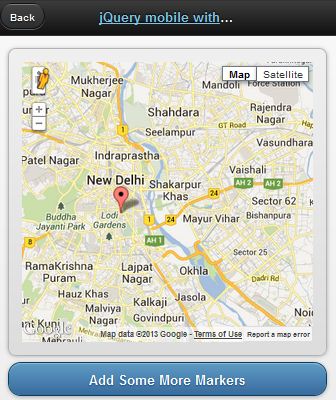
jQueryMobile with Google Map

[caption id="attachment_900" align="alignnone" width="336"]jQueryMobile with Google Map jQueryMobile with Google Map[/caption]

Demo

This demo is based on jQuery UI plugin for Google Maps.

[sourcecode language="javascript"]
<!doctype html>
<html lang="en">
<head>
<title>jQuery mobile with Google maps</title>
<link rel="stylesheet" href="http://code.jquery.com/mobile/1.2.0/jquery.mobile-1.2.0.min.css" />
<script src="http://code.jquery.com/jquery-1.8.2.min.js"></script>
<script src="http://code.jquery.com/mobile/1.2.0/jquery.mobile-1.2.0.min.js"></script>
<script type="text/javascript" src="http://maps.google.com/maps/api/js?v=3&sensor=false&language=en"> </script>
<script type="text/javascript" src="http://jquery-ui-map.googlecode.com/svn/trunk/ui/min/jquery.ui.map.min.js"></script>
<script type="text/javascript">

var colombo = new google.maps.LatLng(26.5727,73.8390);
var delhi = new google.maps.LatLng(28.6100,77.2300);
mobileDemo = { 'center': '28.6100,77.2300', 'zoom': 12 };

function initialize() {
$('#map_canvas').gmap({ 'center': mobileDemo.center, 'zoom': mobileDemo.zoom, 'disableDefaultUI':false });
$('#map_canvas').gmap('addMarker', { 'position': delhi } );
}

$(document).on("pageinit", "#basic-map", function() {
initialize();
});

$(document).on('click', '.add-markers', function(e) {
e.preventDefault();
$('#map_canvas').gmap('addMarker', { 'position': colombo } );
});
</script>
</head>
<body>
<div id="basic-map" data-role="page">
<div data-role="header">
<h1><a data-ajax="false" href="#">jQuery mobile with Google</a></h1>
<a data-rel="back">Back</a>
</div>
<div data-role="content">
<div style="padding:1em;">
<div id="map_canvas" style="height:350px;"></div>
</div>
<a href="#" data-role="button" data-theme="b">Add Some More Markers</a>
</div>
</div>
</body>
</html>
[/sourcecode]

Wednesday, September 4, 2013

Find Visitor's IP address in PHP

Relying on $_SERVER['REMOTE_ADDR'] to find your client's ip address is not always good. Looking for a wide solution?

Then use this function.

[sourcecode language="php"]
function get_ip() {
$ip = '';
if ($_SERVER['HTTP_CLIENT_IP'])
$ip = $_SERVER['HTTP_CLIENT_IP'];
else if($_SERVER['HTTP_X_FORWARDED_FOR'])
$ip = $_SERVER['HTTP_X_FORWARDED_FOR'];
else if($_SERVER['HTTP_X_FORWARDED'])
$ip = $_SERVER['HTTP_X_FORWARDED'];
else if($_SERVER['HTTP_FORWARDED_FOR'])
$ip = $_SERVER['HTTP_FORWARDED_FOR'];
else if($_SERVER['HTTP_FORWARDED'])
$ip = $_SERVER['HTTP_FORWARDED'];
else if($_SERVER['REMOTE_ADDR'])
$ip = $_SERVER['REMOTE_ADDR'];
else
$ip = '';

return $ip;
}
[/sourcecode]

Saturday, August 31, 2013

Sending Emails with Swift Mailer

"Swift Mailer integrates into any web app written in PHP 5, offering a flexible and elegant object-oriented approach to sending emails with a multitude of features."

Download Documentation

[sourcecode language="php"]
<!--?php require_once 'swiftmailer/lib/swift_required.php'; // Create the Transport //SMTP /*$transport = Swift_SmtpTransport::newInstance('smtp.example.org', 25) --->setUsername('your username')
->setPassword('your password')
;

*/

// Sendmail
//$transport = Swift_SendmailTransport::newInstance('/usr/sbin/sendmail -bs');

// Mail
$transport = Swift_MailTransport::newInstance();

// Create the Mailer using your created Transport
$mailer = Swift_Mailer::newInstance($transport);

// Create a message
$message = Swift_Message::newInstance('Wonderful Subject')
->setFrom(array('john@doe.com' => 'John Doe'))
->setTo(array('receiver@domain.org', 'other@domain.org' => 'A name'))
->setBody('Here is the message itself')
;

// Send the message
$result = $mailer->send($message);
?>

[/sourcecode]

Tuesday, August 27, 2013

jQuery UI Dialog with Custom Buttons

[caption id="attachment_883" align="alignnone" width="645"]jQuery UI Dialog jQuery UI Dialog[/caption]

[sourcecode language="javascript"]
<div id="dialog" title="Delete">
<p>Are you sure that you want to delete this division?</p>
</div>


$("#dialog").dialog({
modal: true,
resizable: false,
width: 800,
buttons: [{
text: "Yes",
click: function() {
alert("Clicked Yes");
}
},
{
text: "No",
click: function() {
$(this).dialog("close");
}
}]

});
[/sourcecode]

Sunday, August 11, 2013

HTML5 SQL Database Tutorial

[caption id="attachment_879" align="aligncenter" width="372"]HTML5 Data Storage HTML5 Data Storage[/caption]

HTML5 supports client side data storage. There are several types of storing data with HTML5

1. local storage through localStorage object

2. session storage through sessionStorage object

3. SQL based database

This tutorial demonstrates how to manage a client side SQL based database with HTML5.

Demo

[sourcecode language="html"]
<!DOCTYPE html>
<html>
<head>
<meta name=viewport content="user-scalable=no,width=device-width" />
<link rel="stylesheet" href="css/jquery.mobile-1.1.0.min.css" />
<script src="js/jquery-1.7.2.min.js"></script>
<script src="js/jquery.mobile-1.1.0.min.js"></script>
</head>
<body>
<div data-role=page id=home>
<div data-role=header>
<h1>Home</h1>
</div>

<div data-role="content">
<a href="#" data-role="button" id="create"> Create table </a>
<a href="#" data-role="button" id="remove"> Delete table </a>
<span> Item </span>
<input type="text" id="item">
<span> Quantity </span>
<input type="text" id="quantity">
<a href="#" data-role="button" id="insert">Insert item</a>
<a href="#" data-role="button" id="list">List items </a>

<ul data-inset="true" data-role="listview" id="itemlist"></ul>
</div>
</div>

<script>
var db = openDatabase ("itemDB", "1.0", "itemDB", 65535);
$("#create").bind ("click", function (e)
{
db.transaction (function (transaction)
{
var sql = "CREATE TABLE items " +
" (id INTEGER NOT NULL PRIMARY KEY AUTOINCREMENT, " +
"item VARCHAR(100) NOT NULL, " +
"quantity int(2) NOT NULL)"
transaction.executeSql (sql, undefined, function ()
{
alert ("Table created");
},error
);
});
});

$("#remove").bind ("click", function (e)
{
if (!confirm ("Delete table?", "")) return;;
db.transaction (function (transaction)
{
var sql = "DROP TABLE items";
transaction.executeSql (sql, undefined, success, error);
});
});

$("#insert").bind ("click", function (event)
{
var item = $("#item").val ();
var quantity = $("#quantity").val ();
db.transaction (function (transaction)
{
var sql = "INSERT INTO items (item, quantity) VALUES (?, ?)";
transaction.executeSql (sql, [item, quantity], function ()
{
alert ("Item created!");
}, error);
});
});

$("#list").bind ("click", function (event)
{
$("#itemlist").children().remove()
db.transaction (function (transaction)
{
var sql = "SELECT * FROM items";
transaction.executeSql (sql, undefined,
function (transaction, result)
{

if (result.rows.length)
{
for (var i = 0; i < result.rows.length; i++)
{
var row = result.rows.item (i);
var item = row.item;
var quantity = row.quantity;
$("#itemlist").append("<li>" + item + " - " + quantity + "</li>");
}
}
else
{
$("#itemlist").append("<li> No items </li>");
}
}, error);

});

});

function success ()
{
}

function error (transaction, err)
{
alert ("DB error : " + err.message);
return false;
}
</script>
</body>

</html>
[/sourcecode]

Please note that Firefox does not support this type of web SQL databases. If you try this in a FF browser, it will throw "ReferenceError: openDatabase is not defined".

Saturday, July 6, 2013

OpenLayers GeoJSON Vector Layer

[caption id="attachment_854" align="alignnone" width="602"]geojson Geojson[/caption]

Let's see how we can add a vector layer to OpenLayers map with the help of  GeoJSON response received from the server. Web Server can produce response in GML, GeoJSON, XML...etc after running a spatial query.
OpenLayers has Format classes for interpreting each kind of response.
This response consists of raw data which should be converted to features and added to a vector layer in order to render with OpenLayers.

[sourcecode language="javascript"]
var newLayer = new OpenLayers.Layer.Vector("Filtered by Zoom Level", {
strategies: [new OpenLayers.Strategy.BBOX(),
],

protocol: new OpenLayers.Protocol.HTTP({
url: "http://localhost/test/a.php?start=79.891119%207.078768&end=81.000609%207.940130&method=SPD",
format: new OpenLayers.Format.GeoJSON({
externalProjection: new OpenLayers.Projection("EPSG:4326"),
internalProject: new OpenLayers.Projection("EPSG:900913")
})
}),

//filter: filter,

// styleMap: styleMap,
format: new OpenLayers.Format.GeoJSON({
externalProjection: new OpenLayers.Projection("EPSG:4326"),
internalProject: new OpenLayers.Projection("EPSG:900913")
})

});
map.addLayers([newLayer]);
[/sourcecode]

Another Way

[sourcecode language="javascript"]
var newLayer = new OpenLayers.Layer.Vector("SPD", {
isBaseLayer: false,

styleMap: new OpenLayers.StyleMap({'default':{
strokeColor: "#F00",
strokeOpacity: 1,
strokeWidth: 2,
fillColor: "#FF5500",
fillOpacity: 0.5,
label : "${ad}",
fontSize: "8px",
fontFamily: "Courier New, monospace",
labelXOffset: "0.5",
labelYOffset: "0.5"
}})
});


OpenLayers.Request.GET({
url: "http://localhost/test/a.php?start=79.891119%207.078768&end=81.000609%207.940130&method=SPD",
headers: {'Accept':'application/json'},
success: function (req)
{
var g = new OpenLayers.Format.GeoJSON();
var feature_collection = g.read(req.responseText);
newLayer.destroyFeatures();
newLayer.addFeatures(feature_collection);
}
});
map.addLayers([newLayer]);
[/sourcecode]

Monday, June 24, 2013

How to split ul into multiple columns

[caption id="attachment_851" align="alignnone" width="308"]ul multi column ul multi column[/caption]

[sourcecode language="css"]
ul{
width: 300px;
overflow: hidden;
}

ul li{
float: left;
width: 75px;
}
[/sourcecode]

Tuesday, June 18, 2013

HTML Email with Codeigniter

[sourcecode language="php"]
$this->email->to( 'abc@gmail.com' );
$this->email->subject( 'Test' );
$this->email->message( $this->load->view( 'email/message', $data, true ) );
$this->email->send();
[/sourcecode]

Monday, May 27, 2013

Codeigniter configuration for PostgreSQL Database

https://www.youtube.com/watch?v=fIu4TGBvZYo


First enable Postgresql extension in php.ini
extension=php_pgsql.dll

You also can enable Postgresql extension for PDO as well.
extension=php_pdo_pgsql.dll

If you forgot to enable this you may come across following error.
A PHP Error was encountered

Severity: Warning

Message: require_once(C:/www/system/database/drivers/postgres/postgres_driver.php) [function.require-once]: failed to open stream: No such file or directory

Filename: database/DB.php

Line Number: 138

Now opendatabase configuration file. You should enter correct settings for connecting with your PostgreSQL database here.
Sample config file.

[sourcecode language="php"]
$db['default']['hostname'] = 'localhost';
$db['default']['username'] = 'postgres';
$db['default']['password'] = 'postgres';
$db['default']['database'] = 'abc_gis';
$db['default']['dbdriver'] = 'postgre';
$db['default']['dbprefix'] = '';
$db['default']['pconnect'] = TRUE;
$db['default']['db_debug'] = TRUE;
$db['default']['cache_on'] = FALSE;
$db['default']['cachedir'] = '';
$db['default']['char_set'] = 'utf8';
$db['default']['dbcollat'] = 'utf8_general_ci';
$db['default']['swap_pre'] = '';
$db['default']['autoinit'] = TRUE;
$db['default']['stricton'] = FALSE;
$db['default']['port'] = 5432;
[/sourcecode]

Sunday, May 19, 2013

Codeigniter Facebook Login Tutorial using Facebook PHP SDK


Demo

Download

Welcome to my new Codeigniter tutorial for Facebook Login. I assume that you are familar with Codeigniter framework before starting the tutorial. However, you can adopt the source code to use in native PHP application if you are not interested in CI. There is another alternative. Previously, I have published two posts related with Facebook Login. You can also refer those tutorials.

Facebook OAUTH dialog with new Graph API
AJAX Facebook Connect Demo

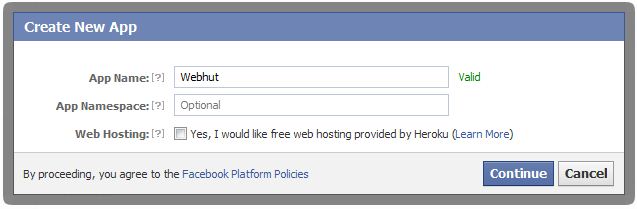
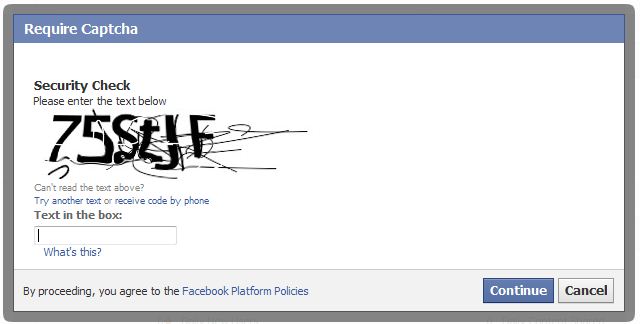
First you need to create a Facebook application.
Visit this link to  create new app.
This is a straight-forward process.

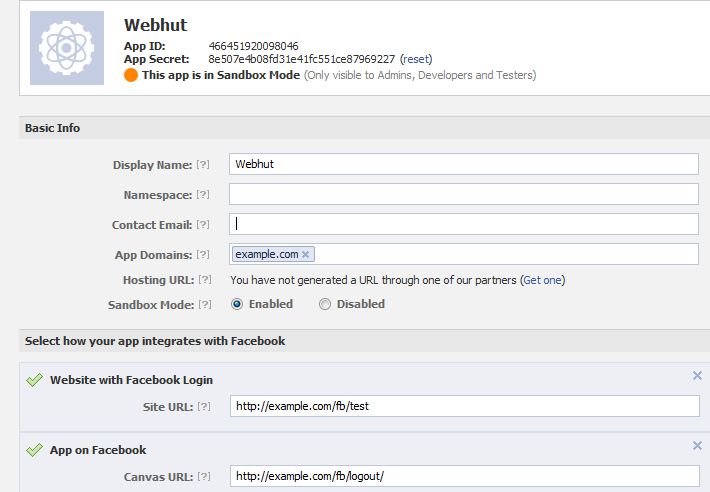
New App


You need to get the App ID and App Secret of your application.

First create a config file to store App ID and App Secret.

config_facebook.php

[sourcecode language="php"]
$config['appID']    = '135042780009818';
$config['appSecret']    = 'c8786043eaf9339d28568520a18b2d2f';
[/sourcecode]

Add a controller that handles Facebook login and logout.
fb.php

[sourcecode language="php"]
<?php
if (!defined('BASEPATH'))
exit('No direct script access allowed');

//include the facebook.php from libraries directory
require_once APPPATH . 'libraries/facebook/facebook.php';

class Fb extends CI_Controller {

public function __construct() {
parent::__construct();
$this->config->load('config_facebook');
}

public function index() {
$this->load->view('head');
$this->load->view('fb');
$this->load->view('footer');
}

public function logout() {
$signed_request_cookie = 'fbsr_' . $this->config->item('appID');
setcookie($signed_request_cookie, '', time() - 3600, "/");
$this->session->sess_destroy();  //session destroy
redirect('/fb/index', 'refresh');  //redirect to the home page
}

public function fblogin() {

$facebook = new Facebook(array(
'appId' => $this->config->item('appID'),
'secret' => $this->config->item('appSecret'),
));
// We may or may not have this data based on whether the user is logged in.
// If we have a $user id here, it means we know the user is logged into
// Facebook, but we don't know if the access token is valid. An access
// token is invalid if the user logged out of Facebook.
$user = $facebook->getUser(); // Get the facebook user id
$profile = NULL;
$logout = NULL;

if ($user) {
try {
$profile = $facebook->api('/me');  //Get the facebook user profile data
$access_token = $facebook->getAccessToken();
$params = array('next' => base_url('fb/logout/'), 'access_token' => $access_token);
$logout = $facebook->getLogoutUrl($params);

} catch (FacebookApiException $e) {
error_log($e);
$user = NULL;
}

$data['user_id'] = $user;
$data['name'] = $profile['name'];
$data['logout'] = $logout;
$this->session->set_userdata($data);
redirect('/fb/test');
}
}

public function test() {
$this->load->view('test');
}

}

/* End of file fb.php */
/* Location: ./application/controllers/fb.php */
[/sourcecode]

In this tutorial, I'm using Facebook JavaScript SDK to load the oauth dialog. You need to add the App ID in following code to initiate the SDK successfully.

[sourcecode language="javascript"]
<img src="<?php echo base_url('assets/images/facebook.png');?>" id="facebook_login">
<script type="text/javascript">
window.fbAsyncInit = function() {
//Initiallize the facebook using the facebook javascript sdk
FB.init({
appId:'<?php $this->config->load('config_facebook'); echo $this->config->item('appID');?>',
cookie:true, // enable cookies to allow the server to access the session
status:true, // check login status
xfbml:true, // parse XFBML
oauth : true //enable Oauth
});
};
//Read the baseurl from the config.php file
(function(d){
var js, id = 'facebook-jssdk', ref = d.getElementsByTagName('script')[0];
if (d.getElementById(id)) {return;}
js = d.createElement('script'); js.id = id; js.async = true;
js.src = "//connect.facebook.net/en_US/all.js";
ref.parentNode.insertBefore(js, ref);
}(document));
//Onclick for fb login
$('#facebook_login').click(function(e) {

FB.login(function(response) {
if(response.authResponse) {
parent.location ='<?php echo base_url('fb/fblogin'); ?>'; //redirect uri after closing the facebook popup
}
},{scope: 'email,read_stream,publish_stream,user_birthday,user_location,user_work_history,user_hometown,user_photos'}); //permissions for facebook
});
</script>
[/sourcecode]
Monday, May 13, 2013

Reverse Geocoding with Google Map API

[caption id="attachment_833" align="alignnone" width="499"]Reverse Geocoding Reverse Geocoding[/caption]

Demo

If you know the latitude and longitude of a particular location, you can get the relevant address details such as city, state, region, country...etc. This process is known as Reverse Geocoding. In this post I 'm gonna show you how this could be achieved with famous Google Map API. This entire post is based on one API request. Look at below code.

[sourcecode language="javascript"]
http://maps.googleapis.com/maps/api/geocode/json?latlng=-37.814251,144.963169&sensor=false
[/sourcecode]

Enter above line in the browser bar to see a whole bunch of location details for the geographical point (-37.814251,144.963169) in lat lng format.
Pretty Simple. Here I'm using Google Map JavaScript API V3. All you need to do is to parse the json response to extract the information whatever you need.

[sourcecode language="javascript"]
jQuery.ajax({
url: 'http://maps.googleapis.com/maps/api/geocode/json?latlng=-37.814251,144.963169&sensor=false',
type: 'POST',
dataType: 'json',
success: function(data) {
if(data.status == 'OK')
{

alert(data.results[1].formatted_address);
alert(data.results[1].address_components[0].long_name);
alert(data.results[1].address_components[1].long_name);

}

},
error: function(xhr, textStatus, errorThrown) {
alert("Unable to resolve your location");

}
});
[/sourcecode]

How to enable CORS in Laravel 5

https://www.youtube.com/watch?v=PozYTvmgcVE 1. Add middleware php artisan make:middleware Cors return $next($request) ->header('Acces...